Multilingual Website: How I Build Them (hreflang, Switchers, What to Translate)
How I build a multilingual website: separate URLs per language, hreflang that Google accepts, a language switch that sticks, and what to leave untranslated.

Short answer
A multilingual website is one site that serves the same content in more than one language, each language on its own URL, with tags that tell Google which page is the translation of which. Get those three things right (separate URLs, correct hreflang, a language switch people can find) and both versions can rank. Get them wrong and Google shows the English page to Greek searchers, or neither.
I build sites from Crete, and most of my clients sell to two audiences at once: Greeks and foreign visitors. Aroma Suites in Santorini runs in English and Greek. This site does too: every article you read here has a Greek twin. Here's how I set them up, and the choices I'd make again.
What a multilingual website needs to work
Four parts, in this order of importance:
- One URL per language.
/blog/articlefor English and/el/blog/articlefor Greek, for example. Never one URL that swaps the text based on a cookie. - hreflang tags that pair each page with its translations.
- A visible language switch that takes you to the same page in the other language, not to the homepage.
- Translated content that's written for the reader, not run through a tool and left there.
The rest (flags or no flags, dropdown or toggle) is taste.
Separate URLs, not automatic redirects
Google's guidance on managing multilingual sites is direct about this: let the user switch the page language, and avoid redirecting people automatically based on what you guess their language is. A redirect like that can stop users, and Google's crawler, from ever reaching the other versions.
So I don't auto-redirect. On Aroma, the English homepage stays English for everyone, and a Greek visitor who wants Greek clicks once. On this site, the button at the top right opens the same article in the other language.
There are three common ways to structure the URLs: subfolders (site.com/el/), subdomains (el.site.com) or separate domains (site.gr). For a small business I use subfolders every time. One domain, one set of backlinks, one site to maintain.
hreflang: the part most sites get wrong
hreflang is a tag in the page head that says "this page also exists in Greek, here." Google's hreflang documentation has two rules that break most setups.
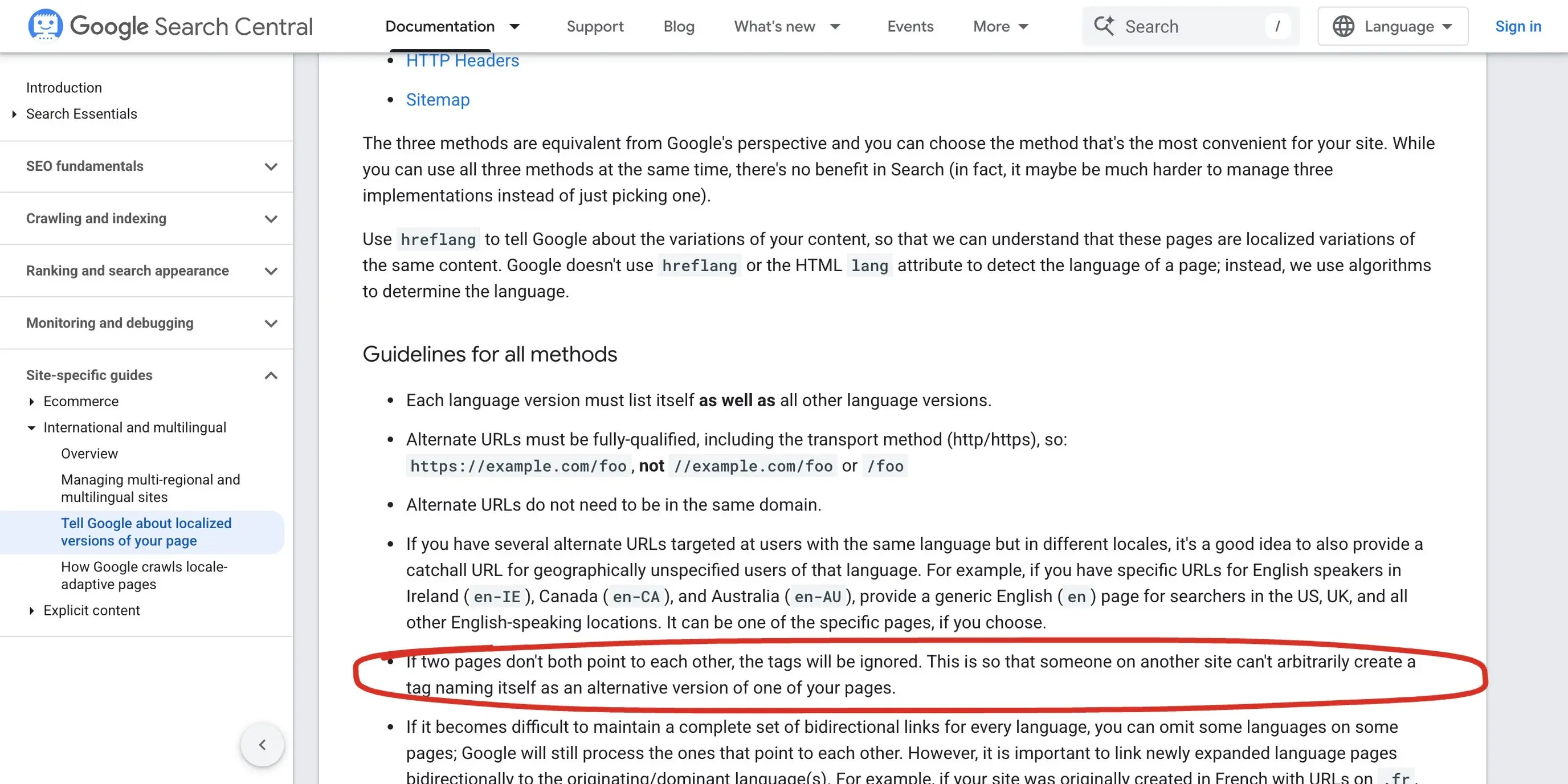 Google's hreflang guidelines, 7 October 2026. The circled line is the one that breaks most setups: if the two pages don't point to each other, Google ignores the tags.
- Each language version must list itself as well as the others. The English page carries an
entag pointing to itself and aneltag pointing to the Greek page. - The links have to go both ways. If the English page points to the Greek one but the Greek page doesn't point back, Google ignores the pair.
Add an x-default for the version you want shown to everyone else. On this site the English URL is the x-default. You can check it on any article: view the source of my Next.js vs WordPress comparison and you'll find en, el and x-default pointing at the right pages. Aroma's homepage carries the same three.
When I build in Next.js, those tags come from the same data that drives the language button, so they can't drift apart. On WordPress, a plugin like WPML or Polylang writes them for you, as long as every page is linked to its translation inside the plugin. A page you forgot to link has no hreflang, and nobody notices for months.
The language switch
The switch is a usability feature first, and it has three jobs:
- Sit where people look for it, top of the page, on every page.
- Take you to the same page in the other language. Sending a reader from an English article to the Greek homepage is the most common mistake I see.
- Remember the choice as you move around the site.
 Aroma Suites' header, 7 October 2026. Two letters next to the menu, one click, and the site stays in the language you picked as you move through it.
Use language names or codes ("EN", "GR", "Ελληνικά"), not flags. A flag is a country, and English isn't one.
What to translate, and what to leave alone
You don't have to translate everything, and sometimes you shouldn't.
On Aroma, the core pages (home, rooms, contact, booking) run in both languages. The travel guides stay in English only, on purpose: the people reading them are international guests planning a trip, not Greek speakers. Translating forty guides for an audience that doesn't search for them in Greek would have cost a lot and earned close to nothing.
My rule: translate the pages a customer in that language needs to decide and to buy. Then add content in the second language only where people in that market search for it. Pages that exist in one language just don't get an hreflang pair, and that's fine.
On this site I went the other way and pair every article, because Greek and foreign business owners both read about web, SEO and AI, and both should be able to switch. Different business, different answer.
Machine translation: start, don't finish
Translation tools are a fine first draft. They are a bad final one. A Greek reader spots a machine-translated page in two lines, and so does a buyer who'd be paying you for care and detail.
Google's multilingual guidance also warns against translating only the boilerplate (menus, buttons) while leaving the main text in the original language. A page like that looks like duplicate content in a different wrapper.
What I do: draft with a tool, then rewrite each page as a native speaker would write it, with local prices, local terms and the questions that market asks. For the Greek version of an article I also run separate keyword research, because Greeks don't search with literal translations of English queries.
Multilingual SEO after launch
Two checks I run after a bilingual launch:
- Search Console, by page. Both language folders should collect impressions within a few weeks. If the
/el/pages get none, check hreflang and indexing first. - The booking or contact path. If you send visitors to a third-party booking engine or form, pass the language along, so a Greek visitor doesn't land on an English checkout. More on that in my piece on technical SEO, and for hotels in hotel SEO.
FAQ
What is a multilingual website?
A site that offers the same content in two or more languages, each on its own URL, connected with hreflang tags so search engines show the right language to the right searcher.
How do I create a multilingual website?
Pick a URL structure (subfolders are simplest), set up each page in each language, connect every translation pair with hreflang both ways, and add a language switch that opens the same page in the other language. On WordPress, a plugin such as WPML or Polylang handles most of this.
Does a multilingual website help SEO?
It lets each language version rank in its own market. It doesn't help a page that nobody searches for in that language, so translate what the market looks for, not everything.
Should the site switch language automatically?
No. Google recommends against redirecting visitors by guessed language. Show a clear switch and let people choose.
Is machine translation bad for SEO?
Unedited machine translation reads badly and can look like low-quality content. Use it as a draft, then have a native speaker rewrite it.
Planning a site in two languages?
Tell me which languages, which markets, and what the site has to sell. I'll tell you which pages need both languages and which don't. See my work, including the MorfoFit Pilates platform case study, or get in touch. If your site already runs on WordPress and feels slow, start with my WordPress speed optimization steps.