WordPress Speed Optimization: How Kokos Rental Went From 74 to 86 on Mobile
WordPress speed optimization on a real site: the image, plugin and script fixes that moved mobile PageSpeed from 74 to 86, and the next step after that.

Short answer
WordPress speed optimization comes down to a short list, in this order: shrink the images (size, format, lazy loading), cut what loads before the page can show (render-blocking CSS and scripts, heavy third-party embeds), add page caching, and remove plugins that do the same job twice. On most slow WordPress sites I see, the main image alone explains most of the problem.
I'm Panagiotis Karampetsos, a web developer in Heraklion, Crete. Below is the real case: Kokos Rental, a car rental company in Chania on WordPress with Elementor. In March 2026 its mobile PageSpeed score went from 74 to 86 in one day of work, and in July I cut the page weight of its fleet pages by more than half. You'll see exactly what I changed, and the next step PageSpeed points to on the same homepage today. The SEO side of the same project is in the Kokos Rental car rental SEO case study.
Where Kokos started
On 18 March 2026, PageSpeed Insights gave the homepage a mobile performance score of 74 and a desktop score of 84. The mobile Largest Contentful Paint (the moment the main content appears) was 4.0 seconds.
The cause was easy to find once I looked at what the LCP element was: the hero photo, uploaded at 2560 by 1707 pixels and shown on a phone a fraction of that size. PageSpeed also flagged 71 KiB of unused CSS and 243 KiB of unused JavaScript, most of it from Elementor and plugins loading everywhere.
Google counts an LCP within 2.5 seconds as good, according to web.dev's Core Web Vitals guide. At 4.0 seconds, Kokos was well outside it.
Step 1: Fix the images
This is where most of the gain was, and it's the first thing I check when someone asks me to speed up a WordPress site.
- One image plugin, not two. Kokos had Smush and ShortPixel both installed. I replaced them with EWWW Image Optimizer, which converts images to WebP and has no file size limit on the free plan.
- WebP for every size. The hero and the fleet photos were served as large JPGs.
- Lazy loading below the fold only. WordPress lazy-loads images by default since version 5.5, according to the WordPress core announcement. The main image at the top must not be lazy-loaded, because it's the one the visitor waits for.
- The right size in each slot. In July I found the car gallery loading full-size photos into thumbnail cells 278 pixels wide. Switching the gallery to WordPress's 768-pixel image size fixed it, and the same mistake in the homepage fleet carousel took the homepage images from 762 KB to 402 KB.
After the March fixes, the mobile score was 86 and desktop 91. The mobile LCP came down to 3.0 seconds.
Step 2: Remove heavy embeds until someone needs them
The contact page had an embedded Google Map. A map embed loads its own JavaScript on every visit, whether or not anyone looks at it. On Kokos it was about 1.9 MB of JavaScript on the initial load.
I replaced it with a facade: a dark card with the address, a button that loads the real map only when clicked, and a direct "Open in Google Maps" link.
 The map still works: it loads when someone asks for it. Until then the page doesn't carry Google Maps' scripts.
The same idea applies to chat widgets, video embeds and review widgets. Load them when the visitor interacts.
Step 3: Caching
Kokos runs WP-Optimize's page cache, with Hostinger's CDN in front. A page cache serves a ready-made HTML page instead of building it in PHP for every visitor.
One thing to know before you change anything: with two cache layers, a change you make in WordPress won't show until both are cleared, and on Kokos there's no single command that clears both. Clear the plugin cache and the CDN after every change, then test.
Step 4: Fewer plugins
Kokos had more than 20 active plugins in March. Every plugin can add CSS and scripts to every page, even pages where it does nothing. The image plugin swap above turned two plugins into one. Trimming the rest is on my list for the site.
The rule I use: if two plugins do overlapping jobs (two SEO plugins, two image optimisers, a page builder plus a separate slider plugin), keep one. On a store the same rule applies, and the rest of the store-specific work is in my WooCommerce SEO guide.
Step 5 of WordPress speed optimization: back up first, change reversibly
Before touching the templates in July, I took a full database backup and kept a copy of every template I edited, so each change could be undone in seconds. Speed work breaks layouts more often than people expect, especially on Elementor sites.
The July results, page by page
These were measured headless, on a cold cache, one run each, so read them as before-and-after on the same setup, not as lab scores:
- Fleet page: 1.4 MB down to 0.66 MB.
- Each car page: 1.47 MB down to 0.59 MB.
- Homepage: images 762 KB down to 402 KB, and the load event from 3.8 to 2.5 seconds.
- Contact page: about 1.9 MB of map JavaScript gone from the initial load.
The next step on Kokos: WordPress site speed in October
On 6 October 2026, the homepage scored 83 on mobile in PageSpeed Insights, and the LCP was 3.0 seconds. Google's "good" threshold is 2.5, so that last half second is the next target. There's no field data from real visitors, because the site doesn't get enough Chrome traffic for Google to report it.
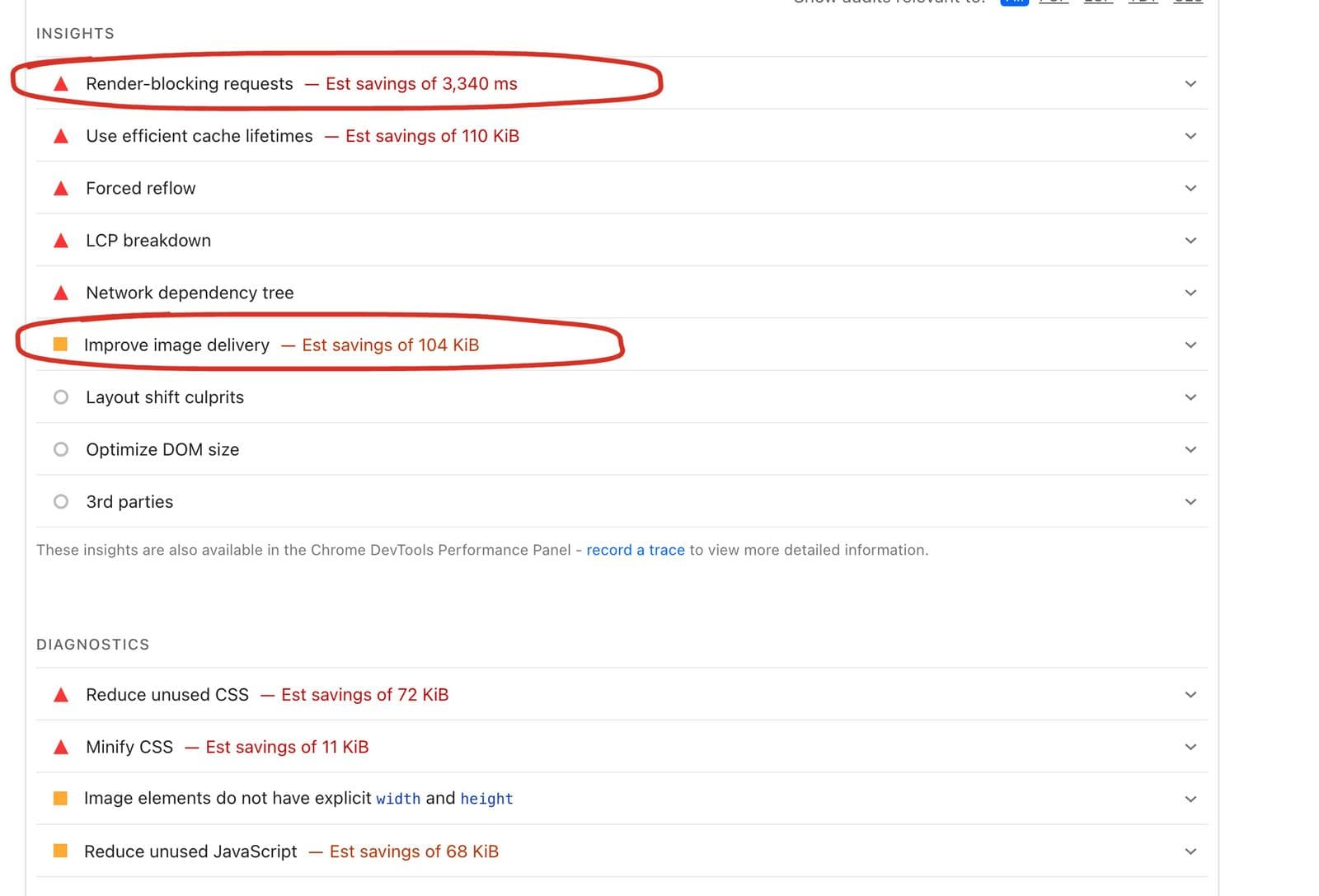 The next two items. With the images fixed, the CSS and scripts that load first are now where the remaining time is.
PageSpeed's list for the same run sets the plan for the next round:
- Render-blocking requests, estimated savings of 3,340 ms. CSS and scripts in the head that the browser must load before it paints anything. On an Elementor site, that's usually the page builder's stylesheets and fonts. The fix is generating critical CSS and deferring the rest. That's the next round on Kokos.
- Improve image delivery, estimated savings of 104 KiB. A small one, after the big image work in March.
- Unused CSS (72 KiB) and unused JavaScript (68 KiB). Already down from March.
The score also moves between runs: 83 in one run on 6 October, 86 on 18 March, without anything breaking in between. That's why I judge speed by the LCP and the list of issues, not by one score. PageSpeed's own documentation explains why its lab and field numbers can disagree, in Google's PageSpeed Insights documentation.
Why the last step is harder on WordPress
Kokos runs on WordPress with Elementor, and that's exactly why the last half second is the hard part. Images, caching and plugins are plug-and-play: you install the right plugin, set it up, and the score moves. Render-blocking CSS isn't. Elementor loads its own stylesheets, fonts and scripts on every page, and a plugin can only rearrange them. Going further means custom code: writing the critical CSS for each template, removing the builder's files from pages that don't use them, and checking that nothing breaks after every plugin update. That's real development work on top of the platform, not a setting.
That's also why I build new sites in Next.js. There, what loads on each page is decided in the code from day one, with no page builder adding its own files. The Aroma Suites site I built in Next.js passes Google's Core Web Vitals assessment on real-visitor data (PageSpeed Insights, 6 October 2026). I compare the two platforms in detail in Next.js vs WordPress. WordPress can still be made fast, as Kokos shows; it just takes more custom work to reach the top.
WordPress speed optimization checklist
- Find the LCP element in PageSpeed Insights. Usually it's the hero image.
- Serve images as WebP, in the size they're displayed, with one image plugin.
- Lazy-load everything below the fold, never the hero.
- Replace map, video and chat embeds with click-to-load facades.
- Turn on page caching, and know how to clear every cache layer.
- Remove plugins that duplicate each other.
- Defer non-critical CSS and scripts; inline critical CSS.
- Back up before you start, and keep every change reversible.
- Re-test on mobile, and compare the LCP, not just the score.
If the site is slow for structural reasons (a heavy theme plus a page builder plus dozens of plugins), there's a point where rebuilding is cheaper than tuning. I compare the two routes in Next.js vs WordPress. For everything else that affects how Google sees a site besides speed, see my technical SEO checklist.
FAQ
Why is my WordPress site so slow?
The most common causes are oversized images, a heavy theme or page builder loading CSS and JavaScript on every page, too many plugins, third-party embeds like maps and chat widgets, and no page caching. PageSpeed Insights shows which of these applies to your homepage.
Is there a free WordPress speed optimization plugin?
Yes. Free image optimizers like EWWW convert images to WebP, and free cache plugins like WP-Optimize add page caching. Use one of each. Plugins can't fix a heavy theme or render-blocking page-builder CSS on their own.
Is WordPress slow compared to other platforms?
WordPress itself isn't slow. Sites get slow from what's added on top: themes, builders, plugins and unoptimized images. Kokos, a WordPress site with Elementor, scored 91 on desktop after one day of fixes. A heavily built site won't get there, whatever you install.
How fast should a WordPress site load?
Aim for a Largest Contentful Paint within 2.5 seconds on mobile, which is Google's threshold for a good experience. A PageSpeed score is a lab estimate; the LCP and the field data from real visitors matter more.
Should I pay for a WordPress speed optimization service?
If the fixes above are beyond your comfort level, or the site is an Elementor build with many plugins, a developer will usually get further, faster, and without breaking the layout. Ask for before-and-after numbers on your own pages, measured the same way.
Want me to look at your WordPress site?
Send me the URL. I'll run it through the same checks, tell you what's slowing it down, and whether it's a day of fixes or something bigger. You can see my work on my portfolio, read what a hotel website costs if you're weighing a rebuild, or get in touch.