Next.js vs WordPress: Which One I'd Pick for a Business Site
Next.js vs WordPress from someone who builds both: speed, SEO, editing, hosting and cost, with a real Next.js hotel site and a real WordPress site.

Short answer
Next.js vs WordPress, in one line: pick WordPress if you want to edit everything yourself, on a small budget, with plugins for the common jobs. Pick Next.js if speed, custom features and a tighter, safer site matter more than editing it without a developer. Both can rank well on Google. The real difference is who maintains the site and how.
I'm Panagiotis Karampetsos, a web developer in Heraklion, Crete, and I build on both. Aroma Suites, a hotel in Santorini, runs on a Next.js site I built. Kokos Rental, a car rental company in Chania, runs on WordPress, and I did its SEO and speed work. Below is how they compare in practice, including where each one has cost me time.
Next.js vs WordPress: the quick verdict
| WordPress | Next.js | |
|---|---|---|
| What it is | A content management system with themes and plugins | A React framework for building the site in code |
| Editing | Built-in admin; owners edit pages, posts, images themselves | No admin unless one is built or a CMS is connected |
| Upfront cost | Lower, especially with a theme | Higher, everything is built |
| Hosting | Any PHP host, often cheap shared hosting | A platform like Vercel, or a Node server |
| Speed | Depends on theme and plugins; can be good | Fast by design, but can still be made slow |
| SEO | Plugins (Yoast, Rank Math) handle titles, sitemaps, schema | Everything is in code; nothing is there unless built |
| Maintenance | Core, theme and plugin updates, security patches | Fewer moving parts, but changes need a developer |
| Best for | Owners who edit often, blogs, standard brochure sites | Custom features, high-traffic pages, sites a developer looks after |
The rest of this article is the reasoning behind each row.
What each one is
WordPress is a content management system: you install it on a server, pick a theme, add plugins for forms, SEO or a shop, and edit everything in an admin panel. It's everywhere: WordPress runs 40.1% of all websites and 58.6% of the sites whose CMS is known, according to W3Techs' WordPress usage statistics on 6 October 2026.
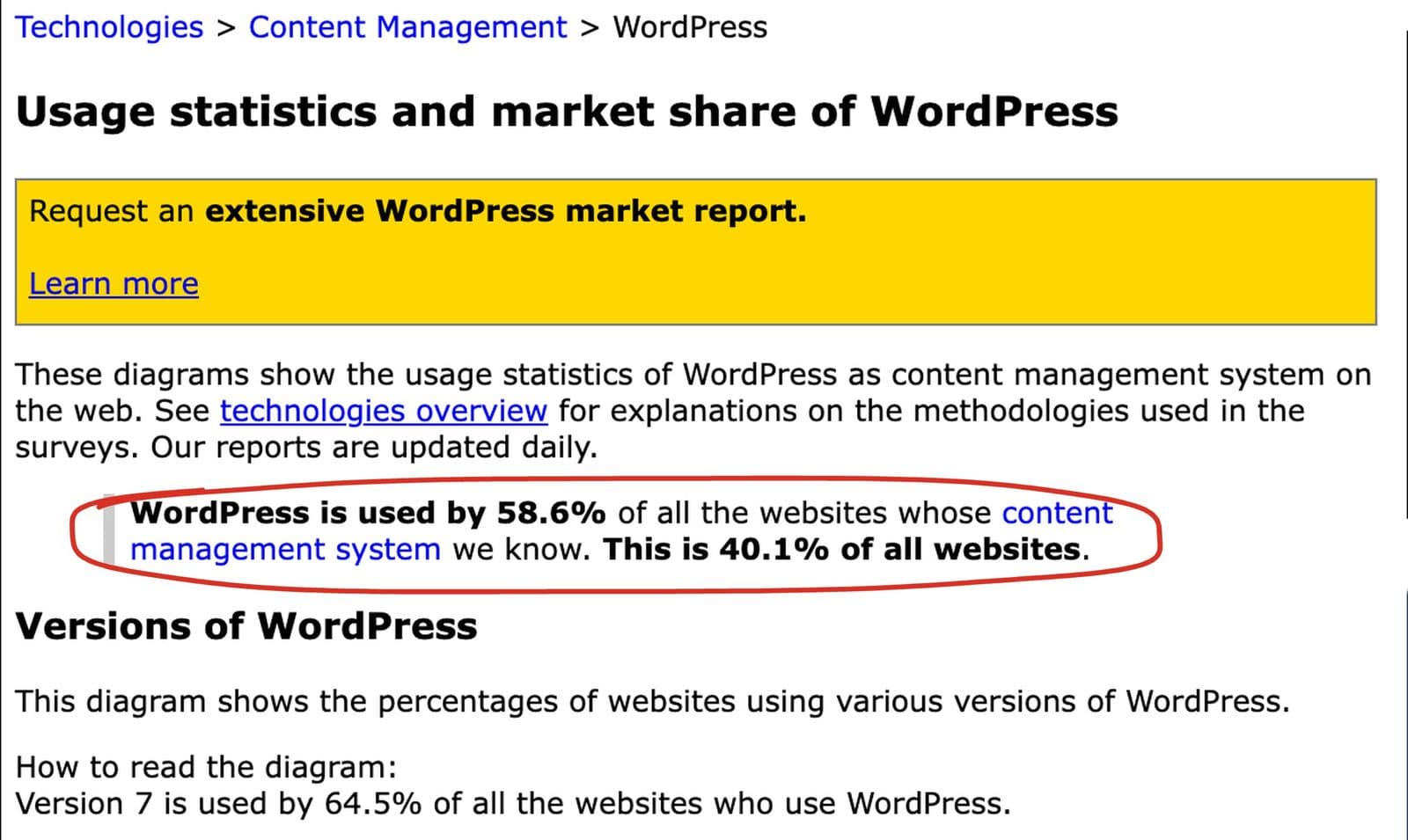 W3Techs on 6 October 2026. So no, WordPress isn't outdated: four in ten websites still run on it.
Next.js is a framework for building websites with React. There's no admin panel, no theme store and no plugin directory. A developer writes the pages, and Next.js can render them ahead of time as static HTML, on the server per request, or a mix of both (the Next.js documentation covers each mode). That's where its speed comes from: a visitor gets finished HTML instead of a page assembled by PHP and a dozen plugins.
Speed: what I measured on two real sites
On 6 October 2026 I ran both homepages through PageSpeed Insights on mobile.
The Next.js site, aromasuites.com, scored 92 in the lab test, and it has enough real visitors for Google's field data: its Core Web Vitals assessment passes, with a Largest Contentful Paint of 1.9 seconds, an Interaction to Next Paint of 108 milliseconds and a layout shift of 0.08.
The WordPress site, kokosrental.gr, scored 83, and has no field data at all, because it doesn't get enough Chrome visitors for Google to report on.
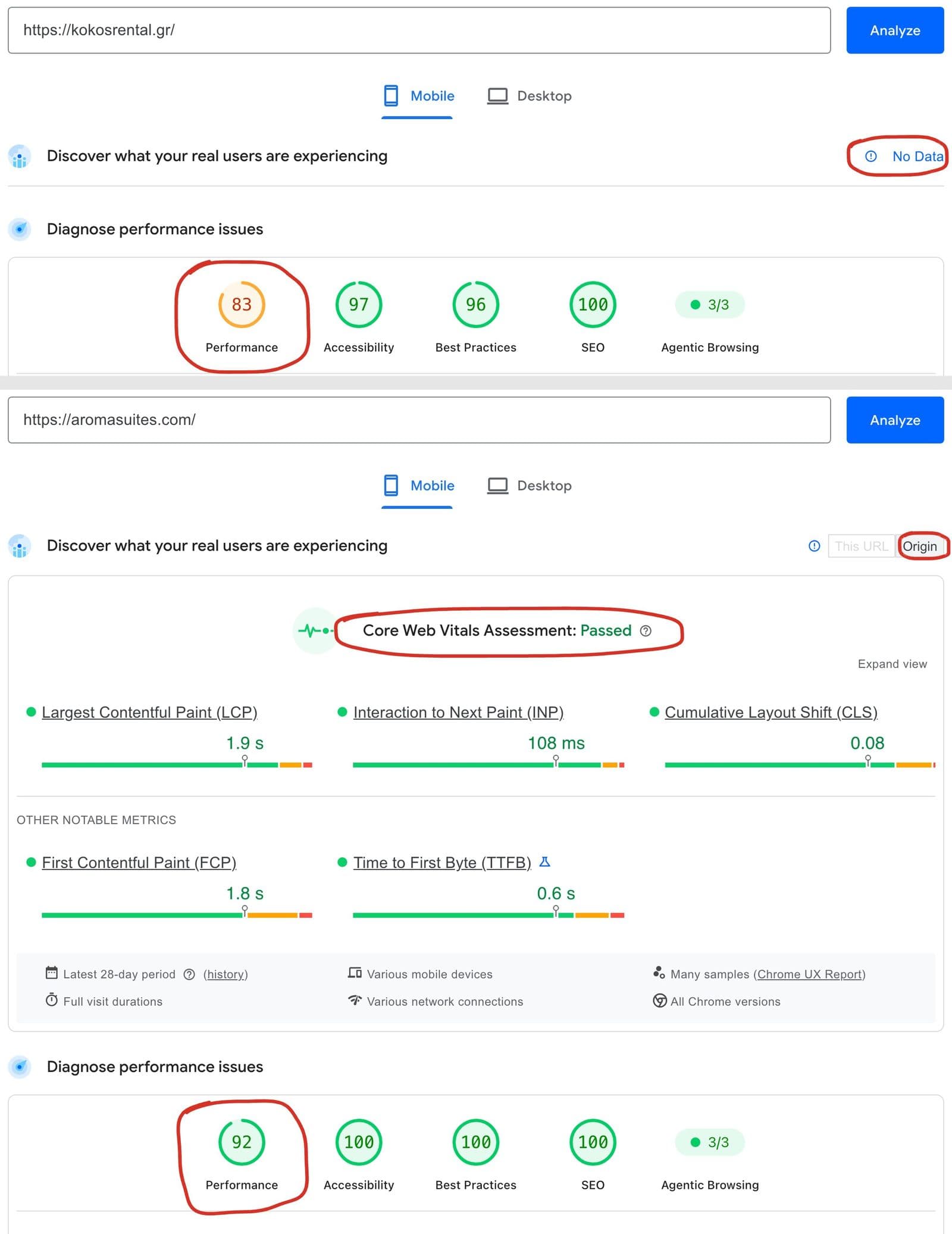 Same day, same tool. Not a fair race (different sites, different photos, different traffic), but it shows the pattern I usually see.
Two caveats, because a comparison like this is easy to oversell.
WordPress can be fast. Kokos went from 74 to 86 on mobile in one day of work in March, without changing platform: one image plugin instead of two, WebP images and lazy loading. Most slow WordPress sites are slow because of a heavy page builder, too many plugins and oversized photos, not because of WordPress itself. I go through the fixes in WordPress speed optimization.
Next.js isn't fast by default. On Aroma, the first build sent every guide's text to the browser on every guide page. I cut the blog's JavaScript bundle from 509 KB to 152 KB and blocking time on the worst posts from 930 ms to 20 ms by moving that work to the server before launch. The framework makes speed easier to get; it doesn't hand it to you.
Next.js vs WordPress for SEO: both rank, the work sits in different places
Google doesn't care which platform built the HTML, as long as it can render it; its JavaScript SEO basics cover what a JavaScript site has to get right. It cares whether the page is crawlable, fast, well structured and useful. Both platforms can deliver that.
The difference is where the SEO work lives.
On WordPress, a plugin like Yoast gives you title and description fields, a sitemap and basic schema out of the box. On Kokos, writing proper titles and meta descriptions for every page was editing fields in an admin, not code. My audit score for the site went from 34 to 88 in a day, mostly through plugins and settings. (That score is from my own checklist, not traffic; I explain it in the Kokos Rental case study.)
On Next.js, none of that exists until someone builds it: the title and description per page, the sitemap, robots.txt, canonical tags, hreflang for languages, structured data. On Aroma I built them all into the code, including Hotel schema on the homepage and HotelRoom schema on each room page. When it's done properly, it's more precise than a plugin. When it's skipped, a Next.js site can be worse for SEO than a default WordPress install.
If you're asking about Next.js SEO specifically: the platform is excellent for it, as long as the person building it knows the checklist. Mine is in technical SEO checklist.
Editing: the difference that matters most for a small business
This is where I'd start the conversation with any client, before speed or SEO.
WordPress comes with an admin. The owner logs in, edits a page, swaps a photo, publishes a post. Nothing else to build.
Next.js comes with nothing. For Aroma I built a custom admin panel: an image manager with alt text, a text editor grouped by page, and a blog editor. That was real build time, and it's time WordPress gives you for free. The alternative is connecting a headless CMS, which is another service to set up and pay for.
So the real question isn't "which is better". It's "who changes the site, and how often". If the owner updates prices and photos every week, WordPress, or Next.js plus a proper editor in the budget. If changes are rare and a developer handles them, Next.js wins on most other rows.
Hosting, maintenance and security
WordPress runs on almost any PHP host, often on inexpensive shared hosting. Kokos runs on Hostinger. The cost of WordPress shows up over time: core, theme and plugin updates, and the security that comes with every plugin being a door. Kokos had more than twenty active plugins when I first looked, and trimming them was on my list.
Next.js usually runs on a platform like Vercel, or on your own server. There's no plugin layer to patch, which removes the most common WordPress attack surface. But it has its own failure modes, and they need a developer to spot.
In July 2026, Aroma used far more server CPU time in one month than its hosting plan allowed. The cause was one line in the site's root layout that made every main page render per request instead of being served as static HTML, plus a lot of bot traffic hitting it. I fixed it in code: articles became fully static again and scanner bots probing for WordPress files got an instant "gone" response at the edge. A WordPress owner would never hit that exact problem. A Next.js owner with no developer would have no idea why the hosting bill jumped.
Headless WordPress: the middle option
Headless WordPress means keeping WordPress as the admin where content is written, and building the public site in Next.js, which pulls the content through WordPress's API. You get the familiar editor and a fast front end.
It also means running and maintaining two systems instead of one. I'd look at it for a content-heavy site with an editorial team that already knows WordPress and needs the speed. For a small business site, it's usually more machinery than the problem needs.
When I'd pick WordPress
- You or your team will edit content often and want to do it without calling anyone.
- The budget is tight and a good theme gets you most of the way.
- You need a common feature (forms, booking widgets, a shop) that a mature plugin already does.
- You don't have a developer on call, and you're fine handling plugin updates.
When I'd pick Next.js
- Speed and Core Web Vitals matter to the business, for example a hotel competing with booking sites on mobile.
- You need custom features: custom booking flows, integrations, AI features, calculators.
- Content changes are occasional and someone technical looks after the site.
- You want fewer moving parts to patch, and you're willing to pay more upfront for it.
For hotels, my own price guide calls a custom WordPress build the sweet spot for most boutique properties, and Next.js the choice when speed and direct bookings justify the extra cost; the reasoning is in what a hotel website costs. Moving an existing WordPress site to Next.js is a redesign, so the URL work in website redesign SEO applies in full.
FAQ
Is WordPress outdated in 2026?
No. WordPress still runs about four in ten websites, according to W3Techs' statistics in October 2026, and it's actively developed. It's the wrong tool for some jobs, not an outdated one.
What are the downsides of Next.js?
Next.js has no admin panel, so editing needs one to be built or a CMS to be connected. Every SEO basic has to be built in code. Changes need a developer, and hosting mistakes (like pages rendering per request by accident) can raise costs without an obvious sign.
Is Next.js good for SEO?
Yes. Next.js can serve fully rendered, fast HTML with precise control over titles, schema, sitemaps and canonicals. The risk is that none of it exists by default, so a Next.js site built without SEO in mind can rank worse than a basic WordPress site.
Is Next.js faster than WordPress?
Usually, because pages can be pre-rendered as static HTML and there's no plugin overhead. But a carefully tuned WordPress site can be fast, and a careless Next.js build can be slow. Measure the actual site, not the platform.
Can I move from WordPress to Next.js without losing SEO?
Yes, if you keep the same URLs where possible, redirect the rest permanently, carry over titles and content, and watch Search Console for "not found" errors after launch. It's a redesign, and it needs the same care.
Is headless WordPress worth it?
For content-heavy sites with editors who already use WordPress and need a faster front end, it can be. For most small business sites, it adds a second system to maintain without enough benefit.
Not sure which one fits your site?
Tell me what the site needs to do and who will edit it, and I'll tell you which I'd build and why, including when the answer is "keep your WordPress and fix it". You can see both kinds of build on my portfolio, or send me a message. If you're replacing an existing site, what a website redesign costs covers the budget side.