Technical SEO Checklist: The 7 Categories I Audit on Every Site
My technical SEO checklist in 7 categories, with the weights I use and a real before and after from a WordPress site I fixed in one day in Chania.
Short answer
A technical SEO checklist is the list of things that decide whether Google can find, read, understand and load your pages: crawling and indexing, page tags, structured data, speed, images, thin pages and how open the site is to AI search. If one of these is broken, good content still doesn't rank, because the search engine never gets a clean look at it.
This is the checklist I run on every site I build or fix, grouped into the same seven categories I score. I'm Panagiotis Karampetsos, I build websites and do technical SEO from Heraklion, Crete, and below you'll see what each category catches on a real site, including the parts where my own numbers don't prove much.
The short answer: my technical SEO checklist in 7 categories
| # | Category | Weight in my score | What it catches |
|---|---|---|---|
| 1 | Crawling and indexing | 25% | Pages Google can't reach, pages it shouldn't index, broken redirects |
| 2 | Content that's too thin to index | 20% | Pages with too little on them to be worth indexing |
| 3 | On-page tags | 15% | Titles, meta descriptions, headings |
| 4 | Structured data | 15% | Schema that's missing, wrong for the business, or invalid |
| 5 | Performance | 10% | Core Web Vitals in the lab and in the field |
| 6 | Images | 10% | Size, format, alt text, lazy loading |
| 7 | AI search readiness | 5% | Whether AI crawlers may read the site at all |
The weights are mine. They reflect how often each category was the thing holding a site back on the projects I've worked on. They aren't Google's weights, because Google doesn't publish any.
What a technical SEO audit checklist is (and isn't)
A technical SEO audit checklist checks the plumbing, not the writing. It won't tell you whether your article answers the question better than the page ranking first. It tells you whether Google can get to that article, understand what it is, and load it fast enough on a phone.
That's why I run it before any keyword work. On a site with a broken base, new content is money spent on pages that never get a fair chance.
A real before and after: one day on a WordPress site
Kokos Rental is a small car rental company in Chania. WordPress, Elementor, Yoast: the usual stack. On 18 March 2026 I ran this checklist on kokosrental.gr, fixed what it found the same day, and scored it again.
My audit score went from 34 to 88 out of 100 (85 right after the fixes, 88 on the re-audit later that day). Across the 12 pages of the site, the fixes came to 64 changes, from titles to schema to security headers.
Here's what that number is and isn't. It's the score of my own seven-category technical SEO checklist, the table above. It isn't traffic, and it isn't rankings: Kokos had no analytics installed, so I can't show you visitors before and after. What I can show you is exactly what was wrong, category by category, and that's what the rest of this checklist uses. The full story is in my Kokos Rental case study.
1. Crawling and indexing
This category carries the most weight because everything else depends on it. A page Google can't crawl or won't index can't rank, however good it is.
What I check:
- Search Console is set up and verified. Kokos had no Search Console at all before 18 March. Once it was connected, Google had indexed 7 of the 24 addresses it knew about.
- The XML sitemap lists only pages you want indexed, and it's submitted. Google's limit is 50,000 URLs or 50MB per sitemap file, according to Google's sitemap documentation, so a small business site never comes close; the usual problem is junk in the sitemap, not size.
- robots.txt doesn't block what you want found. robots.txt controls crawling, not indexing. Google says plainly that it's not a mechanism for keeping a page out of Google; for that you use
noindex. - Every page has a self-referencing canonical, unless it deliberately points to another version.
- Old and broken URLs redirect with a permanent redirect, one hop, to the closest matching page. On Kokos, Search Console showed old car addresses like
/cars/note/returning "not found". Three redirects fixed the real ones; the rest were WordPress junk that drops off by itself. - Language versions point at each other. If page A lists page B as its translation, B must list A back; Google lists this as a missing return link, one of the most common hreflang mistakes, and the tags may then be ignored. I found exactly this on my own site: one Greek page pointed its English alternate at the homepage, which didn't point back.
2. Content too thin to index
This one surprises people, because content sounds like the opposite of technical. But "crawled, currently not indexed" in Search Console is often a thin-page problem, and you only see it from the technical side.
The Kokos homepage had 309 words. I expanded it to 672, written around what people renting a car in Chania need: delivery to hotels and the airport, the fleet, the booking steps. Several car pages had a couple of hundred words each and near-identical text, and one of them sat in "crawled, not indexed".
What I check:
- Pages Search Console lists as crawled but not indexed, and how much is on them.
- Near-duplicate pages (two car models with the same paragraph and a different name).
- Archive, tag and author pages that WordPress creates on its own and nobody wrote.
3. On-page tags: titles, descriptions, headings
These are the fastest fixes on the list. They're also the ones I find broken most often. On Kokos:
- Every page title followed the pattern "HOME - kokosrental.gr", "CONTACT - kokosrental.gr". The homepage title now leads with "Car Rental Chania".
- No page had a meta description, although Yoast was installed. Google wrote its own snippets from whatever text it found.
- The homepage had six H1 headings, a common Elementor pattern where every section title gets an H1.
What I check: one unique title per page that says what the page is, a meta description written for the click, exactly one H1, and headings that go H2, then H3, without skipping levels.
4. Structured data
Structured data tells search engines what the business is, so they don't have to guess. Almost every site has some. The real question is whether it's the right type, filled in, and valid.
On Kokos, the site had Organization schema with only a name, a URL and a logo. It now has AutoRental (a type of LocalBusiness) with address, phone and opening hours, and Product schema on every car page with its price. For online stores, product markup is one piece of WooCommerce SEO, alongside categories and filters.
It also had FAQPage schema on the FAQ page, which I removed. Google announced in August 2023 that FAQ rich results will only be shown for well-known, authoritative government and health websites. On Kokos the markup was also duplicated and invalid, so it was all cost and no benefit.
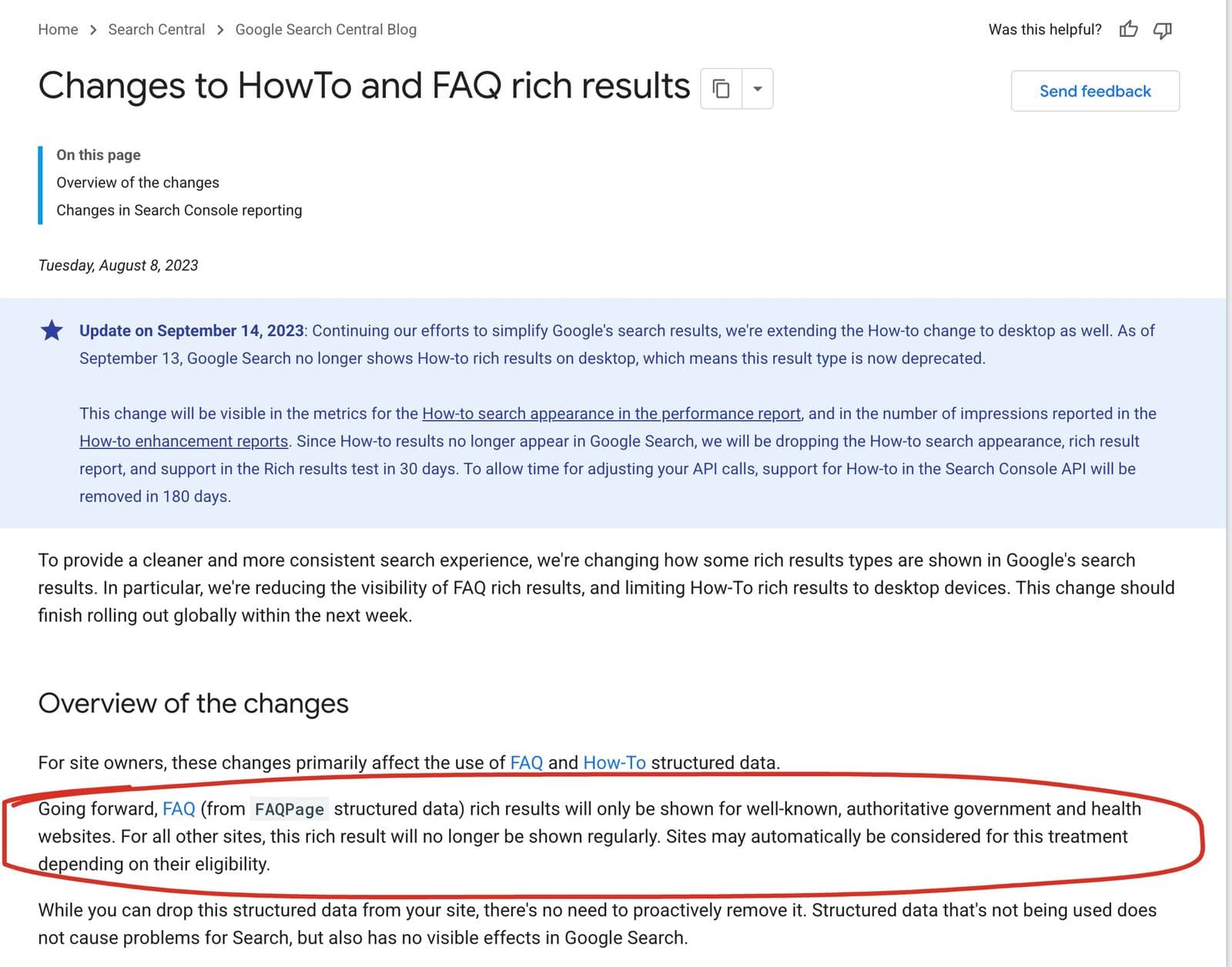 Google's own announcement. Many WordPress sites still add FAQ schema expecting the dropdowns in search results that commercial sites stopped getting in 2023.
What I check: the schema type matches the business (Hotel, AutoRental, ProfessionalService, not a generic Organization), the details match the business's Google Business Profile word for word, and the Rich Results Test shows no errors.
5. Performance and Core Web Vitals
Google's thresholds for a good experience are a Largest Contentful Paint within 2.5 seconds, an Interaction to Next Paint of 200 milliseconds or less, and a Cumulative Layout Shift of 0.1 or less, according to web.dev's Core Web Vitals guide.
Two things matter more than the score itself.
Lab and field are different numbers. PageSpeed Insights runs a lab test on an emulated phone, and separately shows field data from real Chrome users if the site has enough of them. Most small business sites don't. When I ran kokosrental.gr through PageSpeed Insights on 6 October 2026, the field section said "No Data", so the only numbers available were lab numbers.
Lab scores move between runs. On 18 March the mobile score went from 74 to 86 after the fixes. On 6 October the same homepage scored 83 in one run. Nothing broke in between; that's normal variance, and it's why I never quote one run as a fact about a site.
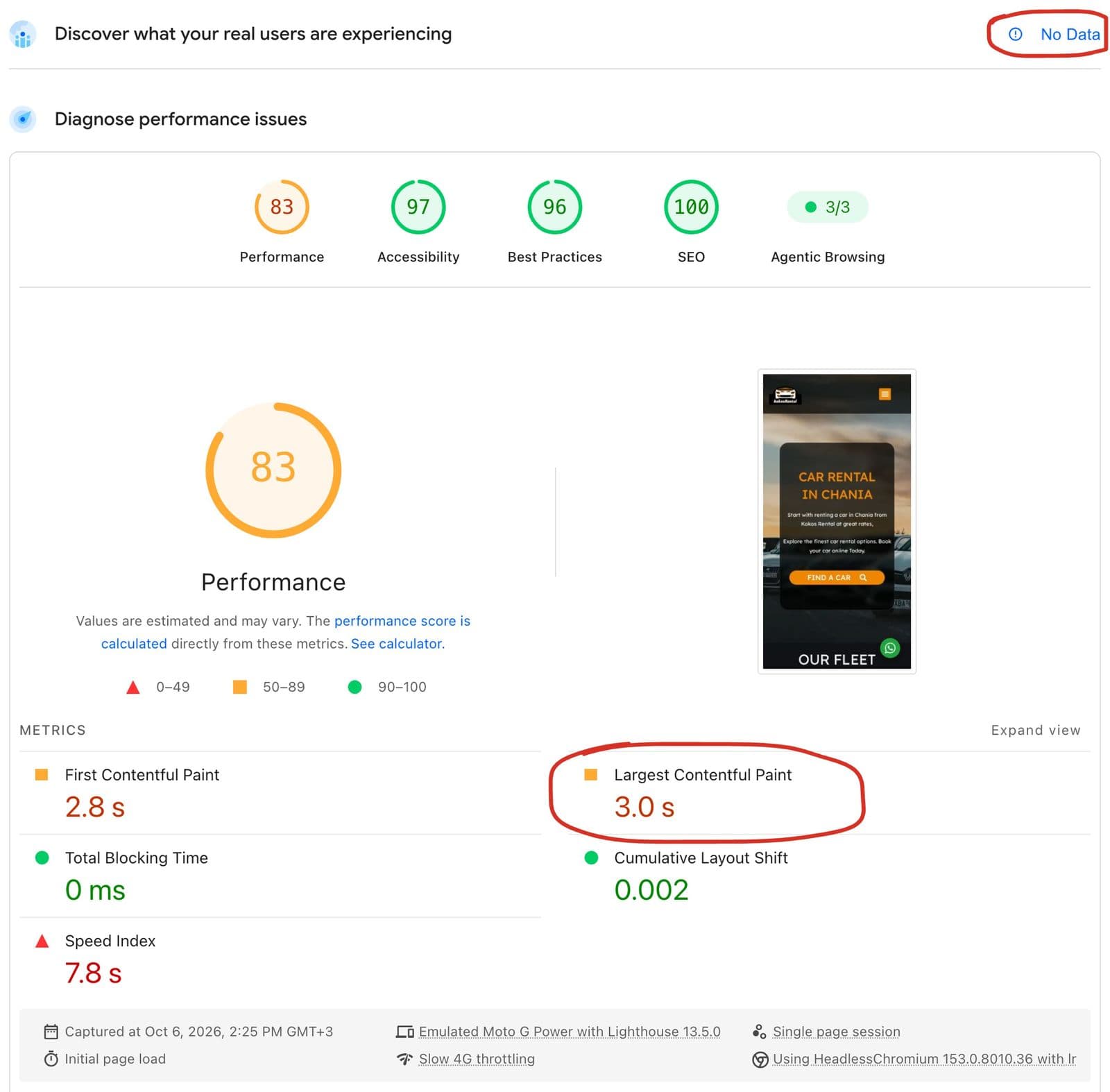 Two things to read first: no real-user data exists for this site, and the slowest metric is the largest image, not scripts.
On Kokos, the mobile Largest Contentful Paint was 4.0 seconds in March, and the cause was the homepage hero photo, uploaded at 2560 pixels wide. That LCP is now 3.0 seconds in the 6 October run: better, and still above the 2.5 seconds counted as good per web.dev. I go through what I changed, and what's left, in my WordPress speed optimization guide.
What I check: field data first if it exists, then the lab LCP element (what it is and how big), render-blocking CSS and scripts, and third-party scripts that load before anyone needs them. On a hotel site I built, a chat widget was one of those scripts; I wrote about delaying it in my hotel chatbot guide.
6. Images
Images are usually the heaviest part of a small business page, and the easiest to fix without touching the design.
What I check:
- Format and size: WebP or AVIF, served at the size it's displayed, not the size it came off the camera.
- Lazy loading for images below the fold, and never for the main image at the top, which should load first.
- Alt text that describes the image. On Kokos, logos and icons had empty alt text; I set every one by looking at the image, not by pasting the page title.
- Width and height set, so the layout doesn't jump while images load.
7. AI search readiness
This carries the smallest weight in my score, and it's the category I see broken most often for no reason at all.
The check is simple: can AI crawlers read the site? Many sites block them without the owner knowing, through a hosting or CDN setting, a security plugin, or an old robots.txt. If ChatGPT's and Perplexity's crawlers can't read your pages, those answers can't cite you.
On my own site, robots.txt allows every AI crawler explicitly and adds a Content-Signal line that says search, AI answers and training are all allowed.
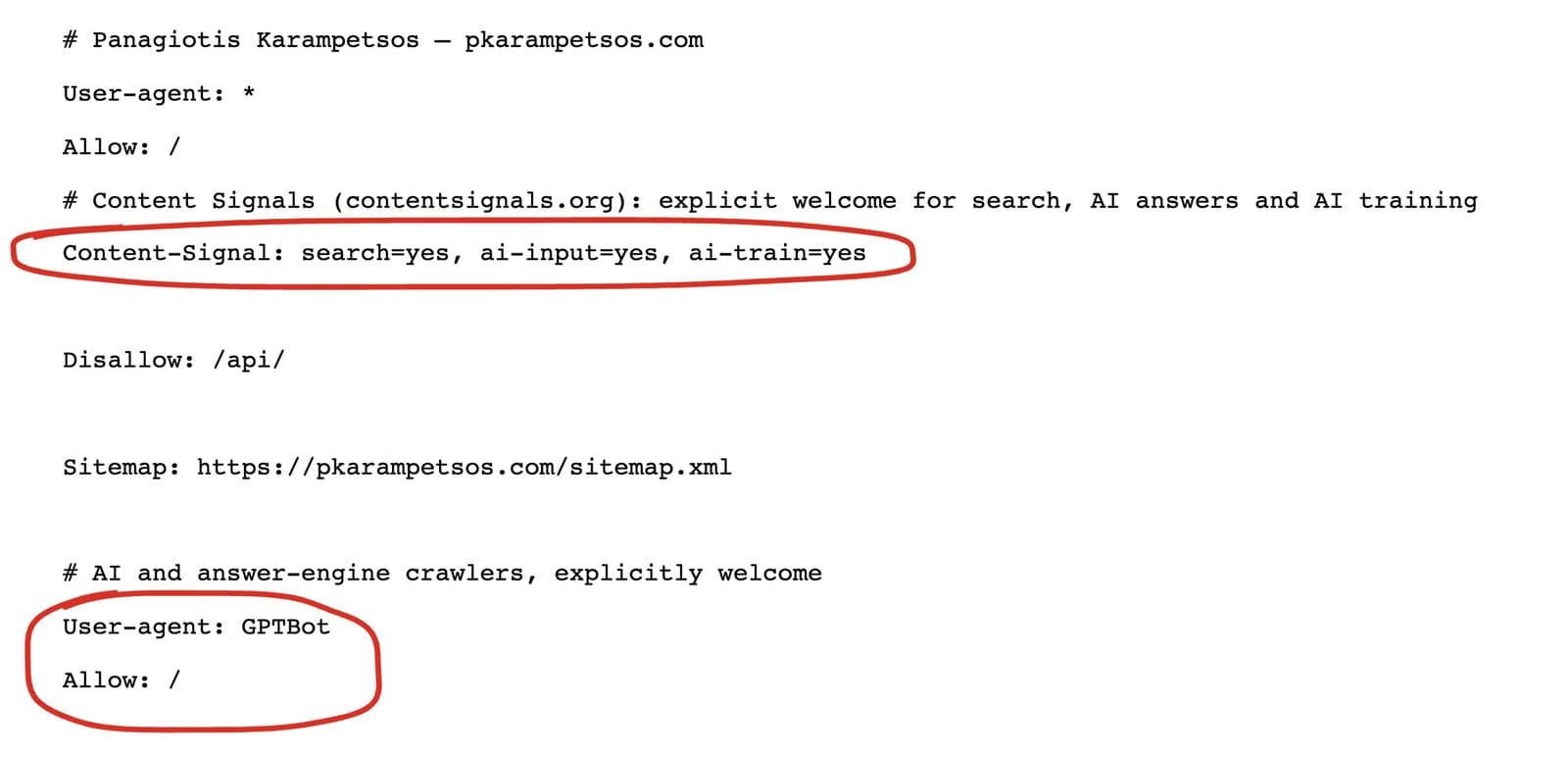 Allowing AI crawlers is one line per crawler. The Content-Signal line tells them what the content may be used for.
Being readable doesn't mean being recommended. I measure how often AI answers mention my own site, and the starting point isn't flattering; I wrote that up in how to rank in ChatGPT.
What I add on top: security and HTTPS
Security headers sit inside my crawling category. I still give them their own line. Kokos was missing five of them (HSTS, X-Frame-Options, X-Content-Type-Options, Referrer-Policy, Permissions-Policy). They don't move rankings on their own, but they're part of what makes a site trustworthy to browsers, and on WordPress a single plugin adds them.
How long a technical SEO audit takes
On a small site, the audit itself takes me a few hours, and fixing what it finds took one working day on Kokos. A site with thousands of pages, several languages or a custom build takes longer, mostly because every fix has to be tested on more templates.
Running the technical SEO checklist again matters as much as running it once. Plugins update, someone uploads a 5MB photo, a new page ships without a meta description. I re-run the checklist after any redesign (see how to redesign a website without losing SEO) and every few months otherwise.
Where a technical SEO checklist stops
A clean result on a technical SEO checklist removes what's blocking you. It doesn't create demand. Kokos scored 88 on my checklist, and that tells you the site is healthy; it doesn't tell you anyone searched for it. If a site has no content that matches what people search for, and no other site links to it, fixing the plumbing alone won't bring traffic. I say that before I take on an audit, not after.
FAQ
What is a technical SEO checklist?
A technical SEO checklist is a list of checks on how search engines crawl, index, read and load a website: robots.txt, sitemap, redirects, canonicals, titles and headings, structured data, Core Web Vitals, images and access for AI crawlers. It covers the site's structure, not the quality of its writing.
What are the basics of technical SEO?
The basics of technical SEO are: Google can reach every page you want found, those pages are indexed, each page has a clear title and one H1, the site loads fast on a phone, and it's served over HTTPS. Search Console shows you most of this for free.
What is the 80/20 of technical SEO?
In my audits, most of the damage comes from a short list: pages that aren't indexed, missing or duplicate titles and descriptions, one oversized image slowing the page, and a robots.txt or plugin blocking something it shouldn't. Fix those first.
How often should I run a technical SEO audit?
Run a technical SEO audit before and after any redesign or platform change, and every few months otherwise. Check Search Console's indexing report monthly, because new problems show up there first.
Is technical SEO still worth it with AI search?
Yes. AI search engines also need to crawl and read your pages before they can cite them. A site that blocks AI crawlers, or hides its content behind slow scripts, is as invisible to them as it is to Google.
Want me to run it on your site?
I run this technical SEO checklist on every site I build, and as a standalone audit on sites built by someone else. You get the findings ranked by how much they matter, and I can fix them for you too. See what I've built on my portfolio, read what a website costs if you're weighing a rebuild, or send me your site and I'll tell you what I'd fix first.