WooCommerce SEO: Categories, Filters and Product Pages That Rank
WooCommerce SEO for a small store: category pages worth ranking, filters that don't flood Google, product pages with their own text, and the checks I run.

Short answer
WooCommerce SEO is mostly structure. Decide which pages should rank (usually categories and products), give each of them its own text and a clean URL, and stop Google from wasting its time on the thousands of filter and sort combinations a store creates. Plugins handle titles, sitemaps and product markup. They don't decide your structure for you.
I build online stores from Crete, on WooCommerce and custom on Next.js. I'll be straight about the proof: I don't have ranking results from a store to show you yet. What I can show is how I set a store up for search, checked live on Mariwn's, a cosmetics shop I built, and the same checklist I run on WordPress sites like Kokos Rental.
WooCommerce SEO starts with which pages should rank
A small store has four kinds of pages that matter for search:
| Page | What people search | What it needs |
|---|---|---|
| Category | "lip oil", "olive oil soap" | An intro paragraph, a clear H1, the products, links to subcategories |
| Product | Brand + product name, specific variants | Your own description, photos with alt text, price and stock in the markup |
| Blog or guide | "how to choose a lip oil" | An answer, and links down to the category |
| Home | Your brand | Links to the main categories |
Most small shops treat the category page as a grid of products with nothing else. That's the page with the best chance to rank for a generic search, so it deserves a short intro written for the buyer: what's in the range, who it suits, what to look for.
WooCommerce SEO for product pages: your own words, one URL per product
Three rules I don't bend:
- Write your own description. If the text is the manufacturer's, the same words sit on every other shop that sells the product, and Google has no reason to pick yours.
- Variants stay on one URL. Colours and sizes are options on one product page, not separate pages competing with each other.
- Mark it up. Product, price and availability in structured data, so Google can show them. Google lists what it reads in its merchant listing documentation. On WooCommerce, SEO plugins such as Yoast or Rank Math add product markup; run a page through Google's Rich Results Test after you install one, don't assume.
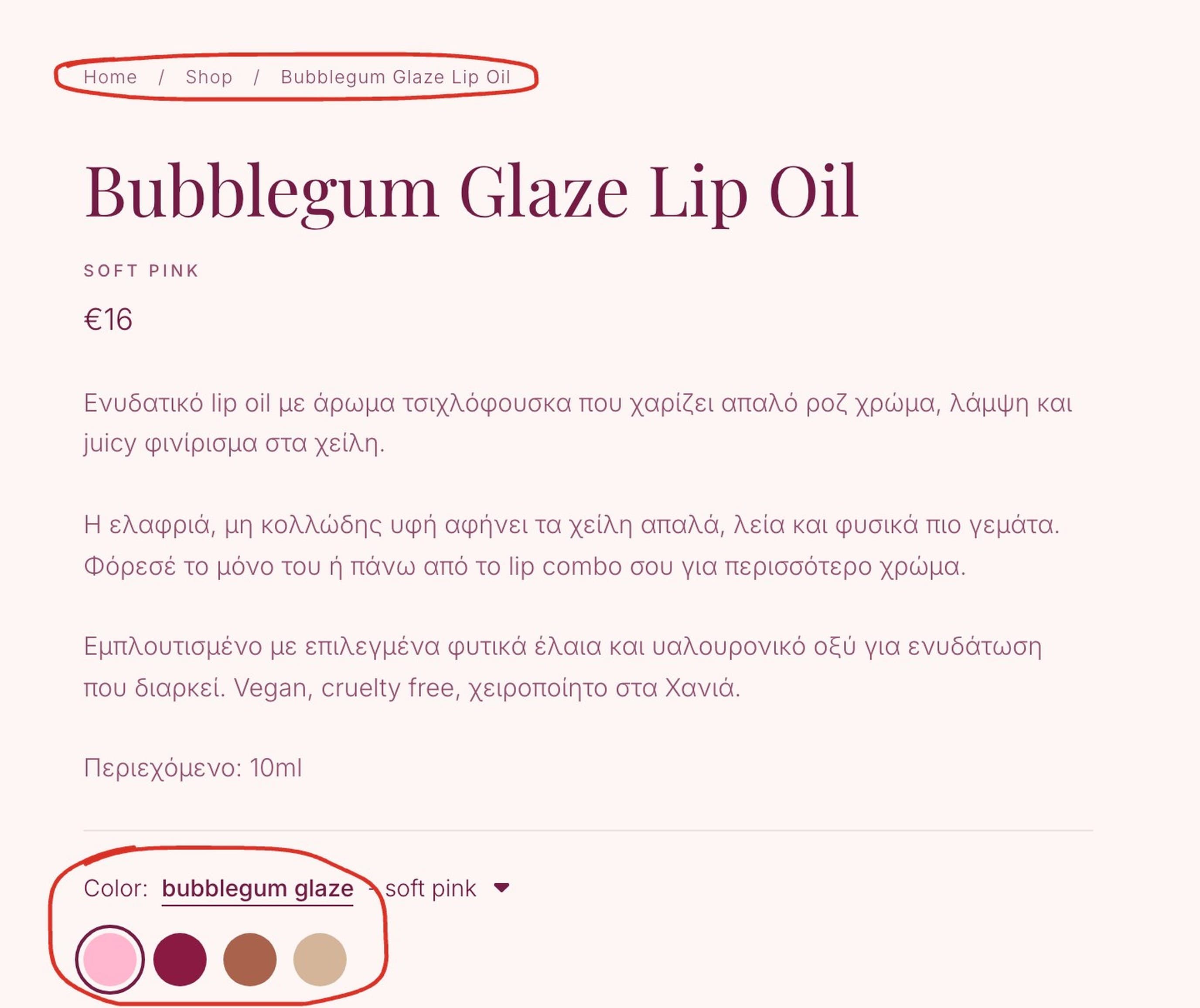 A product page on Mariwn's, 7 October 2026. The breadcrumb gives Google and the reader the path back to the category; the four colours are options on one URL, not four pages fighting for the same search.
On Mariwn's, every product page I checked today carries Product, Offer and BreadcrumbList markup and a canonical tag pointing to itself. That's the baseline I'd expect from any store, WooCommerce or not.
Filters and sorting: the part that sinks stores
Every filter a shopper clicks can create a new URL: colour, size, price, sort order. Combine five filters and you have thousands of addresses that show the same products in a different order. Google calls this an infinite URL space, and its guidance on faceted navigation is clear: if you don't need those filter URLs in search, stop them being crawled.
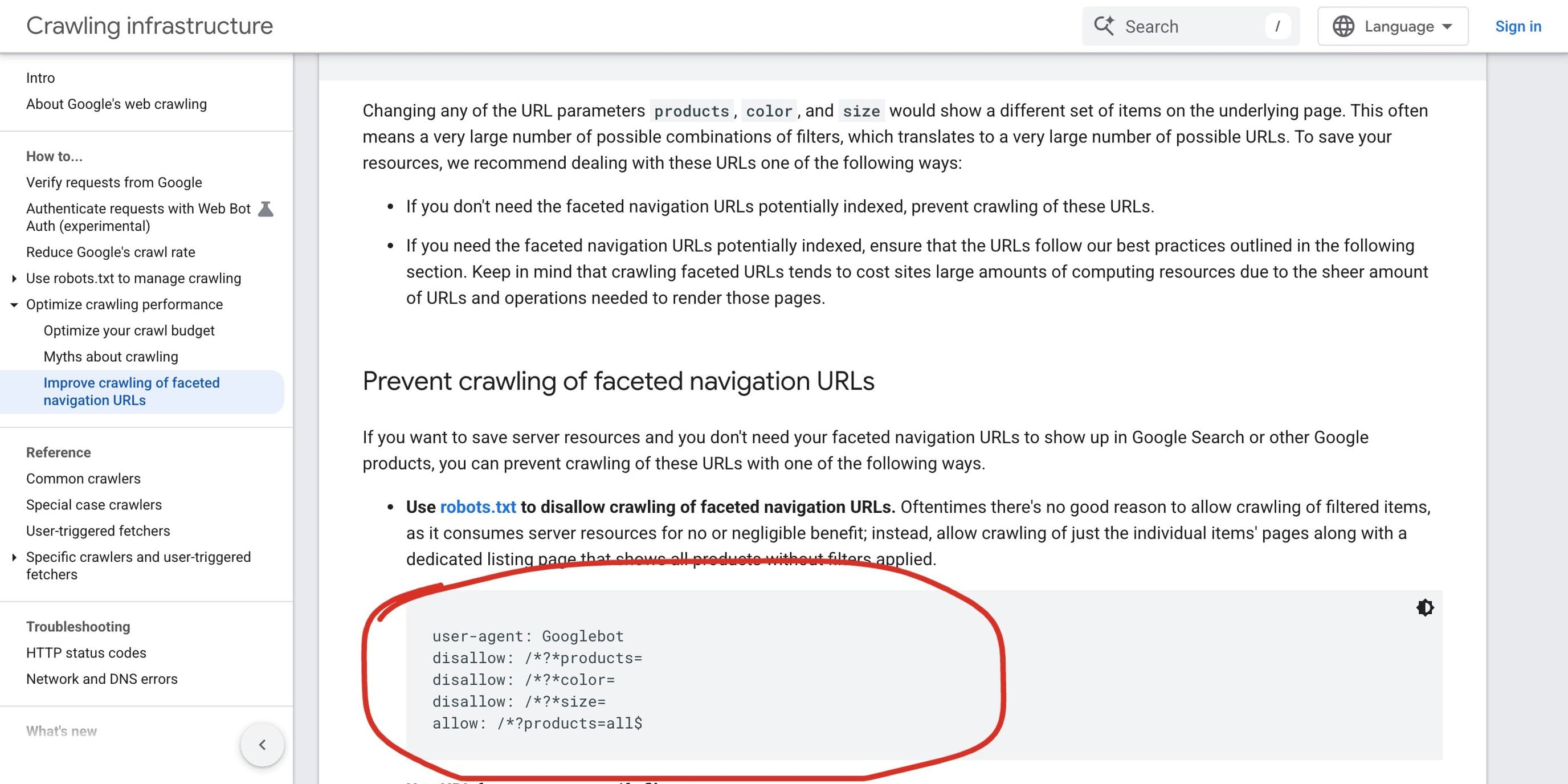 Google's faceted navigation guidance, 7 October 2026. The circled robots.txt lines block crawling of filter parameters, which is how you keep Google on the category pages that matter.
On WooCommerce, the sort dropdown adds ?orderby= to the URL, and filter widgets add their own parameters. What I do:
- Find every parameter the store creates (browse it, click every filter, watch the address bar).
- Block crawling of the ones that only reshuffle products, in robots.txt, the way Google's example does.
- Keep the filter combinations that people search for ("red lip oil") as proper category pages with their own URL and text, not as filter URLs.
Never block a page in robots.txt that you also want removed from Google's index. A blocked page can't be crawled, so Google never sees a noindex on it.
Pagination
Long categories split into page 2, page 3 and so on. Google's ecommerce pagination guidance says to give each page its own URL and not to use the first page as the canonical for the whole sequence. Some SEO setups canonicalise everything to page 1, and then products that only appear on page 3 lose their link from the category. Check yours.
Out-of-stock and discontinued products
- Temporarily out of stock: keep the page live, mark it out of stock, and show alternatives. The page keeps its rankings for when stock returns.
- Gone for good: redirect the URL to the closest product or the category. A 404 throws away whatever links and rankings that page had.
The same thinking applies when a whole store moves platform. I wrote the redirect process up in website redesign SEO.
Speed and the basics
A slow store loses buyers before it loses rankings. WooCommerce speed depends on hosting, theme and plugin count, and the fixes are the same as for any WordPress site: compress and resize images, cut plugins you don't use, lazy-load what's below the fold. My WordPress speed optimization article has the details from a real site.
For the rest of the technical side (sitemaps, indexing, broken links, schema), I run the same list on stores as on any site, in my technical SEO checklist.
An ecommerce SEO checklist I run on every store
- Each category has a unique title, an H1 and a short intro.
- Each product has its own description, alt text on images, and Product markup with price and availability.
- Variants are options, not separate URLs.
- Filter and sort URLs are blocked from crawling or kept out of search, except the ones you've turned into real categories.
- Paginated pages have their own URLs and canonicals.
- Breadcrumbs on every product and category, with BreadcrumbList markup.
- The XML sitemap lists categories and products, not filter URLs.
- Search Console is set up, and the Pages report shows no surprise "Duplicate without user-selected canonical" pile-up.
If you're still picking a platform, my WooCommerce vs Shopify comparison covers that decision first.
FAQ
Is WooCommerce good for SEO?
Yes. It runs on WordPress, gives you full control over URLs, titles and markup, and works with mature SEO plugins. Whether a WooCommerce store ranks depends on its structure and content, not on the platform.
Do I need an SEO plugin for WooCommerce?
It saves a lot of work: titles and descriptions per page, an XML sitemap, breadcrumbs and product markup. Yoast and Rank Math are the common choices. Test the markup after installing, because themes sometimes add their own and you end up with two.
What are the most useful ecommerce SEO tips for a small store?
Write your own product and category text, keep variants on one URL, stop filter URLs from being crawled, and make category pages worth ranking. Most small stores lose more to duplicate filter pages than to anything else.
Should I index filtered pages?
Only the filter combinations people search for, and then as proper category pages with their own text. The rest should be kept out of crawling, as Google's faceted navigation guidance recommends.
What's the difference between WordPress and WooCommerce?
WordPress is the website system. WooCommerce is a plugin that adds products, a cart and checkout to it. WooCommerce SEO is WordPress SEO plus the store-specific parts: products, categories, filters and stock.
Want a second pair of eyes on your store?
Most WooCommerce SEO problems I find are visible in ten minutes of clicking. Send me the URL. I'll click through your filters, check your product markup and your sitemap, and tell you what's wasting Google's time. See my work or get in touch.