Website Redesign SEO: How I Relaunch a Site Without Losing Rankings
Website redesign SEO from a real relaunch: the URL map, redirects, 410s, what I missed and fixed two days after launch, and the checks I run after.

Short answer
Website redesign SEO comes down to one rule: every address Google already knows on your old site must still lead somewhere sensible on the new one. Keep the same URL where you can, redirect permanently where you can't, and tell Google plainly about the pages that are gone. Most rankings lost in a redesign are lost because old URLs start returning "not found", not because the new design is worse.
I'm Panagiotis Karampetsos. I build websites and handle their SEO from Heraklion, Crete. Below is exactly how I relaunched a hotel website in Santorini, what I got right before launch, the 404s I still missed, and the checks I run on every relaunch since.
Website redesign SEO: why rankings drop after a relaunch
A redesign almost always moves rankings for a while. Google's own site move documentation tells you to expect temporary ranking fluctuation while it recrawls and reindexes. That part is normal.
What isn't normal is a permanent drop, and that usually has one of four causes:
- URLs changed and nothing redirects. Google's old URLs return 404, and the rankings attached to them go with them.
- Content was cut. The new design looks cleaner because half the text is gone, including the text that ranked.
- Technical basics broke. A staging
noindexleft on, a robots.txt that blocks everything, titles reset to a template default. - The new site is slower. Heavier scripts, larger images, a slider nobody asked for.
All four are preventable. The first one is where most of the damage happens, so that's where I start.
Step 1: Map every URL Google knows, before you design anything
A website redesign SEO checklist starts before the first mockup. On the Aroma Suites rebuild, the audit of the old WordPress site was on 17 March 2026 and the new Next.js site went live 11 days later. The URL work happened in between, not after.
Here's how I build the list of old URLs:
- Google's index. A
site:search on both the www and the non-www version of the domain. - A crawl of the live site (I use Firecrawl's map), again on both versions.
- The old sitemap, plus any older sitemaps still on the server.
- Search Console, if the site has it: the Pages report lists URLs Google knows that a crawl might miss.
Aroma turned out to have two old sites, not one: a WordPress site on the main domain and a much older HTML site whose pages Google still remembered on the www version.
Step 2: Keep the URL, redirect it, or retire it
Every old URL gets one of three answers.
Keep it. If the new site has the same page, it gets the same address. This is the best outcome, because nothing has to be transferred at all. On Aroma, my first build had given the six room pages short codes as slugs. Before launch I changed all six back to the old site's descriptive addresses, like /accommodation/jacuzzi-cave-suite. Zero redirects needed, and the slugs carry the words people search for.
Redirect it. If the page moved or merged, the old address sends visitors and Google to the closest new page with a permanent redirect. Google treats both 301 and 308 as permanent; it's the same signal that the new URL should replace the old one, according to Google's redirects documentation. Next.js answers every permanent redirect with a 308, per the Next.js redirects documentation, and that's what Aroma's redirects return today.
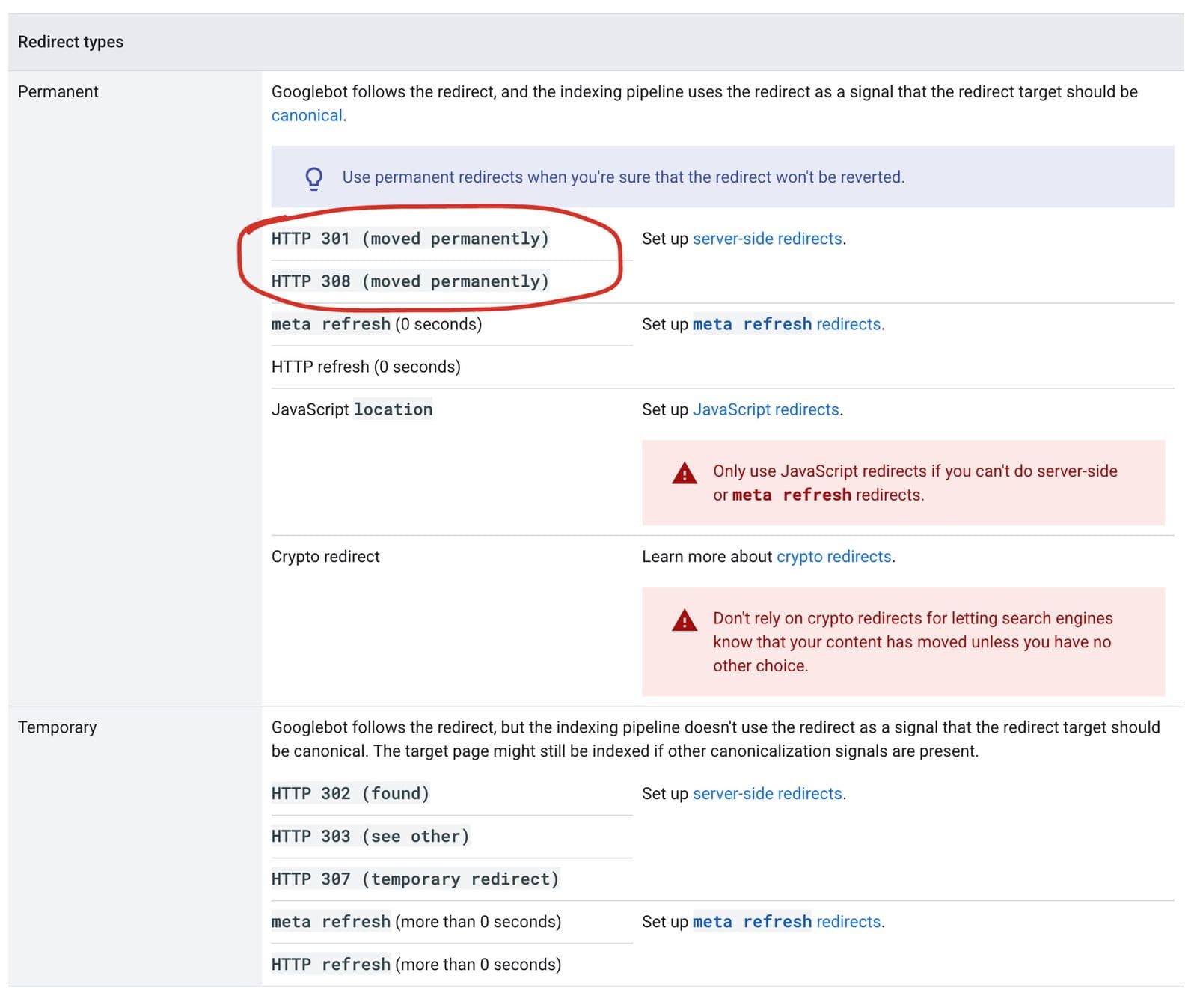 If your developer says "it's a 308, not a 301", that's fine. Google lists both as permanent redirects.
Retire it. Junk WordPress pages, the default "hello world" post, empty category and author archives: these get a 410 Gone, which tells Google the page was removed on purpose. Redirecting them all to the homepage is the lazy option, and Google warns in the same site move guide that sending many old URLs to one irrelevant page can be treated as a soft 404.
That last one was my own shortcut. On Aroma, some WordPress system addresses (/wp-content/, /wp-admin/, login files) still redirect to the homepage. They never ranked for anything, so no harm was done, but today I'd give them a 410 like the other junk.
I save the whole thing as a URL map, one row per old address with its action. That map is the core of my website redesign SEO process: nothing launches until every row has an answer.
Step 3: Launch, then watch Search Console for two weeks
This is the part I didn't get fully right, and it's the reason I check Search Console daily after every relaunch now.
Aroma launched on 28 March 2026. Two days later, Search Console listed 54 URLs as "Not found (404)". They were old WordPress and HTML addresses Google was still crawling that my pre-launch map hadn't caught, such as /location.html, /gallery.html and /offers.html. I added 15 more permanent redirects that same day, covering them individually and by pattern.
By 6 April, Search Console showed 78 pages indexed, and 53 old URLs still listed under "Not found" with their redirects or 410s already in place and validation running. That lag is normal: Google updates that report as it recrawls, not when you deploy.
On 6 October 2026 I checked a sample of those old addresses again: /suites.html and /rooms.html still answer 308 to /accommodation, and /hello-world still answers 410. Google's site move guide says to keep redirects for as long as possible, generally at least 1 year, according to Google's site move documentation. I keep them indefinitely. They cost nothing.
What I check every day in the first two weeks:
- Search Console Pages report: new 404s, "Page with redirect", "Crawled, currently not indexed".
- The sitemap: submitted, only new URLs in it, no redirected or noindexed addresses.
- A handful of the old URLs that ranked best, by hand, to confirm they land on the right page.
Step 4: Don't lose the content that ranked
Redirects keep the address. They don't keep the page's value if the new page says less.
Before a redesign I list the pages that bring search traffic (from Search Console, or from a crawl if the site has none) and treat their content as something to carry over, not rewrite from scratch. On Aroma, the rooms kept their names and descriptions, and the new site launched with 28 travel guides written for the searches guests make before they book.
Aroma had no Search Console or analytics on the old site, so I can't show you a before and after. What I can show you is what happened from zero: Google Analytics recorded 537 organic sessions in the first three weeks after launch (28 March to 18 April 2026), the figure shown on my portfolio. The full story, including what traffic did and didn't turn into, is in the Aroma Suites case study.
Step 5: Check the technical basics on launch day
Most of these take seconds, and every one of them has broken a relaunch somewhere:
- No
noindexleft over from staging, on any template. - robots.txt allows crawling, and the sitemap URL in it is the new one. It should also keep letting in the AI crawlers, or ChatGPT search can't cite you (more in how to rank in ChatGPT).
- Canonical tags point at the live domain, not the staging domain.
- Titles and meta descriptions came across, page by page, not reset to the site name.
- Structured data still validates (on a hotel: Hotel and HotelRoom schema).
- Analytics and Search Console are verified on the new site before launch, so day one is measured.
If you want the full list, it's the same one I run on any site: my technical SEO checklist.
Step 6: Make sure the new site is faster, then measure it with real users
A redesign is the cheapest moment to fix speed, because you're rebuilding anyway. Lab scores like PageSpeed's are useful during the build. After launch, what counts is the field data from real Chrome users, which needs a few weeks of traffic before it appears.
Six months after the Aroma relaunch, PageSpeed Insights shows that field data for the whole domain: the Core Web Vitals assessment passes, with a Largest Contentful Paint of 1.9 seconds, an Interaction to Next Paint of 108 milliseconds and a layout shift of 0.08. The lab score for the homepage on the same day was 92.
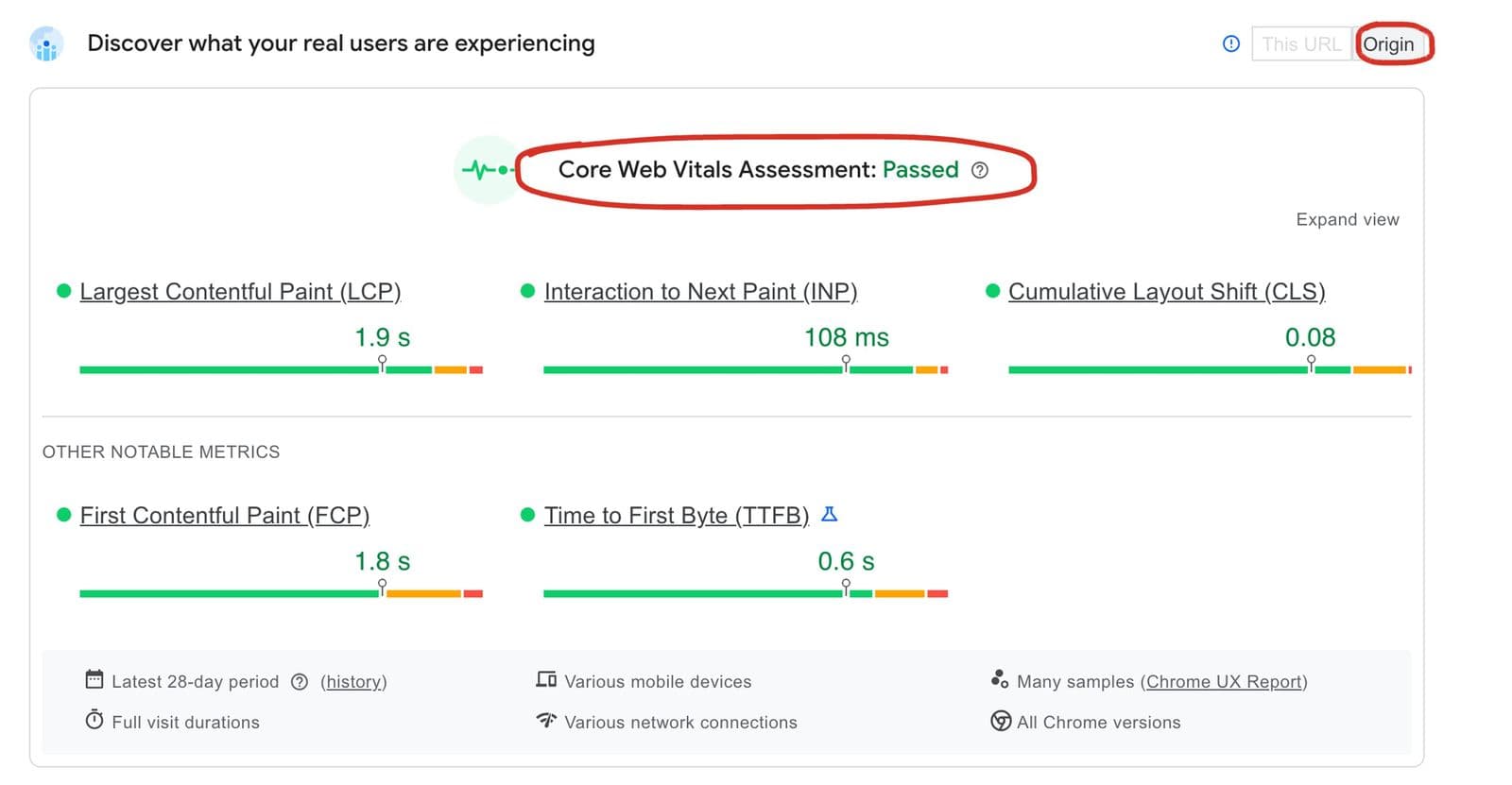 Field data, not a lab run: 28 days of real visitors on mobile. "Origin" means it covers the whole domain, because the homepage alone doesn't have enough visits yet.
If you're redesigning a WordPress site and keeping WordPress, the speed work is different; I cover it in WordPress speed optimization.
Small sites need this too
Kokos Rental, a car rental company in Chania, wasn't even a redesign. Somebody had renamed a few car pages on the WordPress site, and that was enough: Search Console showed old addresses like /cars/note/ and /cars2/ returning "not found". Three redirects fixed it. The other 404s were WordPress leftovers that fade out on their own. Ten minutes of work, same principle as a full relaunch.
Website redesign SEO checklist: the short version
- List every URL Google knows, from the index, a crawl, the sitemap and Search Console.
- Keep the same URL wherever the page still exists.
- Redirect moved pages permanently (301 or 308) to the closest new page, one hop.
- Return 410 for junk, instead of redirecting it to the homepage.
- Carry over the content of the pages that ranked.
- On launch day, check noindex, robots.txt, canonicals, titles, schema and analytics.
- Watch Search Console daily for two weeks and fix every new 404.
- Keep the redirects for at least a year. I keep them for good.
FAQ
Does a website redesign affect SEO?
A website redesign affects SEO when URLs change without redirects, when ranking content is removed, or when technical settings break. Done carefully, a redesign causes only temporary fluctuation while Google recrawls, and it can improve SEO if the new site is faster and better structured.
How do I redesign a website without losing SEO?
Map every old URL before you design, keep URLs where pages still exist, use permanent redirects for moved pages, return 410 for junk, carry over the content that ranked, and monitor Search Console daily for the first two weeks after launch.
Should I use a 301 or 308 redirect?
Either. Google treats both as permanent redirects. 301 is the classic one; Next.js sends 308 for every permanent redirect. Avoid temporary redirects (302, 307) for pages that moved for good.
How long should I keep redirects after a redesign?
Google recommends keeping them as long as possible, generally at least one year. There's no SEO benefit to removing them, so I leave them in place.
How long does it take to recover rankings after a redesign?
If the URLs are handled properly, there's often no real drop to recover from, only some movement while Google recrawls. Google's guidance is that a medium-sized site can take a few weeks or more for most pages to move over.
Planning a redesign?
I do the URL map and the redirects as part of every rebuild, not as an extra. If you're weighing a redesign, read what a website redesign costs and what a hotel website costs, look at the sites I've built, or send me your current site and I'll tell you which URLs I'd protect first.