n8n vs Make: Which One I Use Inside the AI Systems I Build
n8n vs Make, from someone who builds AI systems for businesses: pricing checked on 7 October 2026, how each one counts usage, and when I write code instead.

Short answer
n8n vs Make, short answer: inside the AI systems I build for businesses, I use n8n, self-hosted, as the connector between the AI and the business's other tools. I pick it over Make for three reasons: n8n charges per workflow run while Make charges per step, I can host n8n on a server the client already pays for, and when a workflow outgrows a visual editor I move it into code anyway. Make is the better pick for a non-technical team that wants a polished visual builder, no server, and a free plan to start.
One thing to know before you read on: I build AI systems (agents, chatbots, document processing) and I write code. Neither tool is the system. They're the wiring between the system and Gmail, the CRM or the booking engine. That's the angle of this comparison.
n8n vs Make at a glance
| n8n | Make | |
|---|---|---|
| What you pay for | Workflow executions: one run of the whole workflow, any number of steps | Credits: in general one per module action, so a 6-step run uses about 6 |
| Cheapest paid cloud plan (7 Oct 2026) | €20/month billed annually, 2,500 executions | $9/month billed annually ($10.59 billed monthly), 10,000 credits |
| Free option | Community Edition, self-hosted, free | Free cloud plan, up to 1,000 credits a month |
| Self-hosting | Yes | No, cloud only |
| Custom code | Code node, JavaScript or Python | Code app, billed by execution time |
| Who it suits | Technical builders, AI agent wiring, high-volume flows | Non-technical teams, quick visual scenarios |
Pricing, checked on 7 October 2026
n8n. According to n8n's pricing page, Starter costs €20 a month and Pro €50 a month, both billed annually. Business is €667 a month billed annually and runs self-hosted. Billed monthly, Starter is €24 and Pro €60. Starter includes 2,500 workflow executions a month, Pro 10,000 and Business 40,000.
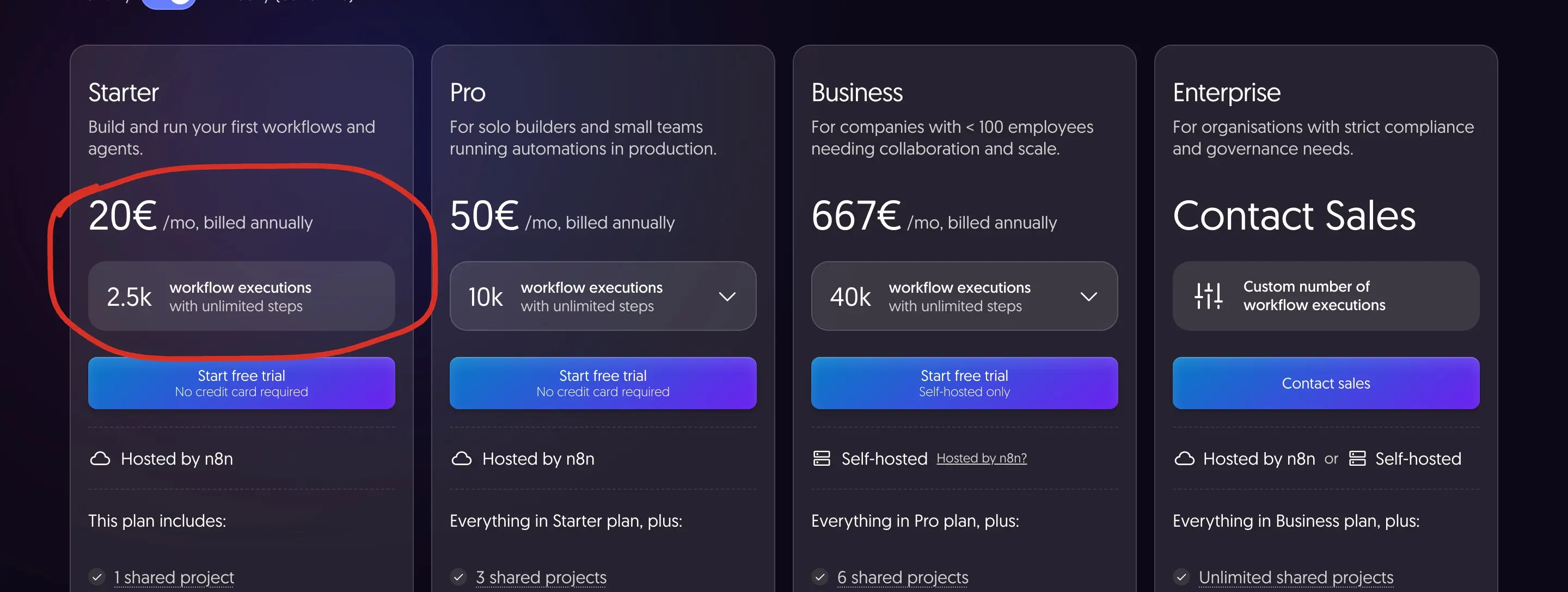 n8n.io/pricing on 7 October 2026. The circled card is the whole pricing model in one line: executions "with unlimited steps", so a long workflow costs the same per run as a short one.
The free route is the Community Edition, which you host yourself. n8n's docs list what it lacks compared with the paid plans, mostly team features like SSO, projects and shared credentials (compare editions). For one person running a business's automations, those gaps rarely matter. What you take on is the server: updates, backups, uptime.
Make. Make's pricing page lists a free plan with up to 1,000 credits a month and a 15-minute minimum between scheduled runs. Paid plans start at $9 a month for Core, $16 for Pro and $29 for Teams, each priced for 10,000 credits a month. Those are the annual-billing figures: the page has a monthly/annual switch and says annual billing saves "15% or more". Billed monthly, Core comes to $10.59 a month (JetAdmin's breakdown of Make pricing, September 2026). Make prices in US dollars; n8n in euros.
How each one counts usage, and why it matters
This is the real difference, and it decides the bill.
n8n counts executions. A workflow that receives a form, enriches the lead, writes it to the CRM, asks an AI model to draft a reply and posts to Slack is one execution, whether it has 5 nodes or 25.
Make counts credits. Its help page on credits says one operation of a normal app equals one credit, and that modules using Make's own AI provider are charged by tokens on top. The same five-step flow uses roughly five credits per run.
A worked example, our calculation: a 6-step workflow that runs 1,000 times a month is 1,000 executions on n8n and about 6,000 credits on Make. Both fit in the entry plans. At ten times the volume, n8n Pro covers it, and on Make you're buying a bigger credit tier. The more steps per run, the more n8n's model favours you.
AI steps make the gap wider. An AI workflow usually has extra steps around the model: fetch context, call the model, validate the output, retry, write the result. On n8n those are free inside the run. On Make, each is a credit.
Which one I use, and where it sits
In the systems I build, the AI part (the agent, the retrieval over the client's documents, the chatbot) lives in code or in a platform built for agents. n8n sits around it and connects it to the business:
- A webhook that gives my SEO agents backlink data: three nodes, Webhook, the DataForSEO node and Respond to Webhook. The agent calls a URL and doesn't need to know about credentials. I wrote it up in 30 n8n automation ideas.
- Form-to-CRM and notification flows where the client's team wants to see and edit the steps.
And the case where I stopped using it: the Liberation Score, a lead magnet that scores a business and emails a personalised PDF report. It started as a 16-node n8n workflow with four Code nodes doing the real work. Before launch we rebuilt it as one Next.js app on the same server, with tests. Once most of the logic lives in Code nodes, the visual editor is overhead.
My rule: n8n for connecting systems and for flows a team wants to see. Code when the workflow becomes the product.
I haven't run Make in a client system. When a client already uses Make and it works, I connect to it rather than move them.
n8n vs Make: when I'd pick Make
- Your team has no developer, and nobody wants to maintain a server.
- You want to start free and your flows are simple: a few steps, low volume.
- You want the most visual editor you can get. Make's scenario builder is easier to read for non-technical people than n8n's canvas.
- You need an app that Make has a ready module for and n8n doesn't. Check both integration lists for the tools you use before deciding.
When I'd pick n8n
- You have someone technical, or you're working with one.
- Your workflows have many steps or run often: per-run pricing wins.
- You want the data to stay on a server you control, for example in the EU.
- You're wiring AI agents to business tools and expect to add custom code.
If you're comparing Zapier as well: it's the easiest of the three to start with and the one I'd use least for AI systems, for the same per-step pricing reason as Make.
FAQ
Is n8n or Make cheaper?
For workflows with many steps or high volume, n8n is usually cheaper, because it charges per workflow run and Make charges per step. For a few simple, low-volume flows, Make's free plan or its Core plan ($9 a month billed annually) can cost less than n8n's paid cloud plans.
Is n8n better than Make for AI agents?
For wiring agents to business tools, I prefer n8n: extra steps around the model cost nothing more, it supports custom code, and it can run on your own server. The agent itself I usually build in code.
Can I self-host Make?
No. Make runs in Make's cloud. n8n can be self-hosted for free with the Community Edition, or bought as a cloud plan.
Is n8n hard to learn?
Harder than Make for someone non-technical. You'll be reading JSON and naming fields. For a developer it's quick.
Should a small business use either?
Only for a process that repeats often and follows clear rules. My AI process automation guide covers how to pick one, and AI automation examples shows what that looks like in real businesses.
Working with me
I'm Panagiotis Karampetsos. I build AI systems for businesses, and I use n8n or code to connect them to the tools the business already runs. If you're deciding between n8n and Make for something specific, send me two lines about the workflow and I'll tell you which I'd use and why. More about how I work is on my AI automation consultant page.