30 n8n Automation Ideas for Service Businesses (and When I'd Write Code Instead)
30 n8n automation ideas for service businesses, with the nodes for each, current n8n pricing, and two real builds of mine, one I moved off n8n.

Short answer
The n8n automation ideas that pay off for a small service business are the boring ones. A form that lands in your CRM and pings you. Booking confirmations and reminders that go out on time. A review request after every visit. A weekly report nobody has to build by hand. An inbox where an AI model sorts the mail and drafts replies that a person approves.
- Start with: one lead-capture flow (#1) and an error workflow, so you hear about failures before your customers do.
- What n8n costs: the self-hosted Community Edition is free. n8n Cloud starts at €20 a month on annual billing (€24 month to month) for 2,500 executions. An execution is one full run of a workflow, however many steps it has. Prices checked on n8n's pricing page on 6 October 2026.
- When not to use it: when the workflow turns into a product with its own screens, tests and business logic. I moved one client build off n8n for exactly that reason. The story is below.
I build AI systems and automation for businesses: AI agents and chatbots on os.liberators.ai (the platform I built), document search over a company's own files, and the workflows that connect them to the tools a team already uses. n8n is one tool in that kit. I reach for it when a visual workflow is the fastest way to connect two systems, and I write code when it isn't. This list is what I'd look at first for a service business, plus two builds of mine that taught me where n8n fits.
Jump to a section
- Two real builds, and what they taught me
- How n8n works, and what it costs
- Lead capture and routing (1-5)
- Bookings, clients and members (6-10)
- Content and social (11-15)
- Internal ops (16-20)
- Sales and pipeline (21-25)
- AI-powered n8n workflows (26-30)
- 5 mistakes to avoid
- n8n vs Zapier vs Make
- FAQ
Two real builds, and what they taught me
Most lists of n8n workflow examples are written from templates. These two n8n examples are mine, with the numbers from the actual runs.
A backlink-data webhook for a Santorini hotel's SEO
I do the SEO for Aroma Suites, a cave hotel in Fira. In June 2026 I needed backlink data for the hotel and its competitors. On our DataForSEO account that data was reachable through DataForSEO's official n8n node, so I put the node behind an n8n webhook: send a domain, get its referring domains back as JSON. It's three nodes: Webhook, the DataForSEO node, and Respond to Webhook. My SEO agents call it like any other API.
The first run compared Aroma Suites with three direct competitors in Fira. Aroma had 104 referring domains. The three competitors had 125, 185 and 349. Diffing the lists gave 415 domains that linked to at least one competitor and not to Aroma. After I filtered out spam scores above 20, directory farms and booking sites, about 14 were worth an outreach email. A second round against luxury hotels in Oia gave 2,369 domains, 400 after filtering, and around 30 strong prospects.
Two things I learned. n8n works well as a small API gateway for AI agents: the agent doesn't need to know about credentials or SDKs, it calls a URL. And two active workflows on the same webhook path conflict, so keep one.
A 16-node n8n workflow I rewrote as code
The Liberation Score is a lead magnet for Liberators AI. A business owner answers 11 questions, gets a score, and receives a personalised 10-page PDF by email while the lead lands in the CRM.
The original design was a Tally form feeding a 16-node n8n workflow. Four Code nodes did the real work: parse the form, compute the score, validate the model's output, build the ClickUp task. Claude Sonnet wrote the report, PDFMonkey rendered the PDF, and Amazon SES sent it.
Before it went live, we rebuilt it as one Next.js app on the Hetzner server that already ran n8n. The reasons:
- Most of the logic already lived in those four Code nodes. The rest was wiring between paid tools.
- A long-running app on a server we already paid for cost nothing extra and didn't need a job queue.
- The PDF now renders inside the same app, in 1.2 to 1.9 seconds once the browser is warm, instead of waiting on a separate service.
- The port came with 66 tests, run against six sample personas. That's easier to trust than four tools with four logins.
- The founder didn't want n8n in the stack going forward.
One bug from that build applies to any AI workflow, n8n included. Claude sometimes added a line of commentary after the JSON it was asked for, and the parser broke. The fix was to extract the JSON object properly and validate it before writing anything anywhere. In n8n, that means a validation step between the model node and every node that writes to a system.
The rule I use now: n8n for connecting systems and for flows a team wants to see and edit. Code when the workflow becomes the product.
How n8n works, and what it costs
n8n is a workflow automation tool. You connect nodes (a Gmail node, an HTTP Request node, a Slack node) into a flow that runs when a trigger fires. n8n's integrations page lists 2,192 integrations as of 23 September 2026, and the HTTP Request node covers most services without one.
The core pieces:
- Triggers. The first node. The common ones are Webhook (something calls a URL), Schedule Trigger (every Monday at 9), Email Trigger (IMAP) for new mail, and app triggers such as Stripe Trigger or Cal Trigger.
- Nodes. Each step after the trigger: an action (send an email), a transformation (Edit Fields), or a condition (If, Switch).
- Credentials. Stored once per service and reused across workflows. Set up Slack, Gmail, your CRM and your model provider before you build anything.
- The Code node. For the logic the built-in nodes don't cover. The Code node runs JavaScript or Python and replaced the old Function node.
The shift that takes people longest is to stop thinking in tools and start thinking in events. "When X happens, do Y" is the unit. If a workflow grows past a dozen or so nodes, it's usually two workflows. n8n can split them for you with sub-workflows.
Run every workflow by hand before you switch it on and read the output of each node. Half of automation work is reading JSON and fixing field names.
The 30 n8n automation ideas below are grouped by the part of the business they help. Each one lists the nodes I'd use, how hard it is to build, and when it's worth the effort.
n8n pricing in 2026
n8n Cloud prices, in euros as the page showed them on 6 October 2026:
| Plan | Annual billing | Monthly billing | Executions per month |
|---|---|---|---|
| Starter | €20/mo | €24/mo | 2,500 |
| Pro | €50/mo | €60/mo | 10,000 |
| Business | €667/mo | €800/mo | 40,000 |
| Enterprise | Contact sales | Contact sales | Custom |
Starter and Pro trials don't need a credit card. The Business plan can also run self-hosted.
The Community Edition is free to self-host, and n8n's docs describe it as having "almost the complete feature set". The missing pieces are team features such as SSO, projects, shared credentials and Git version control (compare editions). For a small business with one person running the automations, those gaps rarely matter. What you take on is the server: updates, backups and uptime.
A quick way to size the plan: count runs, not steps. A contact-form flow that runs 300 times a month uses 300 executions, whether it has 4 nodes or 14.
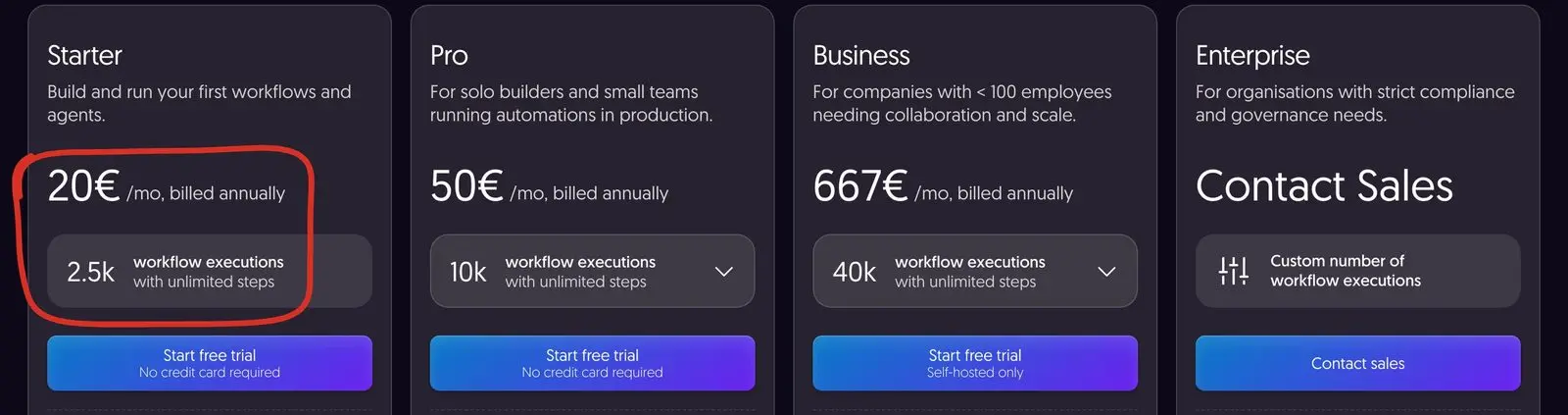 The entry plan on n8n's pricing page, 6 October 2026. The circled line says it: you pay per workflow run, with unlimited steps inside each one.
Lead capture and routing
Service businesses lose leads in the gap between "form submitted" and "someone read it". These five close that gap.
1. Contact form to CRM, Slack and an auto-reply
Someone fills out your contact form. n8n writes the lead to your CRM, posts a summary in a Slack channel, sends an auto-reply with a booking link, and tags the lead by source.
- Nodes: Webhook > Edit Fields > HubSpot or Notion > Slack > Gmail
- Complexity: Low
- Worth it when: leads reach an inbox that more than one person is supposed to watch.
My own site does this in code rather than n8n. The form writes the contact to a Brevo list, emails me, and records where the visitor came from. The first real lead taught me something no template covers, and it's in the mistakes section below.
2. Lead enrichment from the email domain
When a lead comes in, look up the company by its email domain. Pull size, industry and LinkedIn page, write them to the CRM record, and tag the lead as a fit or not.
- Nodes: Webhook > HTTP Request (Apollo, Hunter or similar) > If > CRM update
- Complexity: Medium
- Worth it when: you sell to businesses and waste calls on leads that were never a fit.
3. Round-robin lead assignment
Hand new leads to the team in rotation, skip anyone on leave, and DM the assigned person with the full context.
- Nodes: Webhook > Data Table or Google Sheets (rotation counter) > If > Slack > CRM update
- Complexity: Medium
- Worth it when: "who's taking this?" is a daily conversation.
4. Missed-call voicemail to a Slack summary
Twilio sends the voicemail recording to n8n. OpenAI's audio operation transcribes it, a model pulls out the caller's name, what they want and how urgent it is, and a summary lands in Slack.
- Nodes: Twilio Trigger or Webhook > OpenAI (transcribe) > OpenAI (extract) > Slack
- Complexity: Medium
- Worth it when: the phone matters and nobody has time to listen to voicemails between jobs.
5. Form spam and pitch filter
Send each form submission through a model that labels it as a real lead, spam or a sales pitch. Real leads go to the team, spam goes to a log, pitches get a polite auto-reply.
- Nodes: Webhook > OpenAI or Anthropic > Switch > CRM, log or auto-reply
- Complexity: Low
- Worth it when: your form attracts more "we offer SEO services" messages than customers.
Bookings, clients and members
Hotels, studios, clinics and anything with appointments or memberships follow the same cycle: enquiry, confirmation, reminder, visit, follow-up. Each step can be automated. For hotels specifically, AI for hotels ranks what to set up first.
6. Branded booking confirmation with a calendar invite
A booking comes in from your booking engine or scheduling tool. n8n sends a branded confirmation email with an .ics invite, writes the booking to Notion or Airtable, and pings whoever needs to know.
- Nodes: Webhook (or Cal Trigger / Calendly Trigger) > Code (build the .ics file) > Gmail or SMTP > Notion > Slack
- Complexity: Medium
- Worth it when: your booking system's own confirmation email looks nothing like your brand.
7. Pre-arrival or pre-session reminder
Every morning, find everyone booked in the next three days and send a personal email: directions, parking, what to bring, and one relevant extra (early check-in, an add-on class).
- Nodes: Schedule Trigger > PMS or CRM query > Loop Over Items > Gmail > CRM (mark as sent)
- Complexity: Medium
- Worth it when: people still call to ask the same practical questions before they arrive.
8. Review request after the visit
Two days after check-out or the last session, send a personal note asking for a Google review with a one-click link. Skip anyone who logged a complaint.
- Nodes: Schedule Trigger > PMS or CRM (filter by date) > If (no complaint) > Gmail > Google Sheets (log)
- Complexity: Low
- Worth it when: you know reviews matter and nobody ever gets round to asking.
9. Cancellation handler
A booking is cancelled. n8n updates the CRM, tells finance and the team, and sends a "want to pick another date?" email if the cancellation came early enough to rebook.
- Nodes: Webhook > CRM update > Slack > If (days before arrival) > Gmail
- Complexity: Medium
- Worth it when: cancellations surprise the people who handle refunds.
10. Failed subscription payment follow-up
For membership businesses (a studio, an online course, a subscription platform). A card payment fails. n8n emails the member with a link to update the card, waits, checks again, and alerts you if it still hasn't gone through.
- Nodes: Stripe Trigger (failed payment) > Gmail > Wait > Stripe (check status) > If > Slack
- Complexity: Medium
- Worth it when: members drop off because a card expired and nobody noticed.
Content and social
A lot of n8n social media automation online is noise. Auto-posting motivational quotes isn't automation, it's a way to look fake. These five keep a human in the loop.
11. One post, rewritten per platform, approved before it goes out
You publish on Instagram. n8n picks up the post, a model rewrites the caption for LinkedIn and X, and the drafts wait in a Notion queue. Nothing goes live until you approve it.
- Nodes: Schedule Trigger > Facebook Graph API (new Instagram posts) > OpenAI > Notion (approval queue) > LinkedIn / X (Formerly Twitter)
- Complexity: Medium
- Worth it when: you already post on one platform and keep meaning to post on the others.
12. RSS feed to newsletter draft
Every Monday, pull the week's posts from your blog's RSS feed, have a model write a two-line summary of each, and create a draft in your email tool. You review and send.
- Nodes: Schedule Trigger > RSS Read > OpenAI > Mailchimp or ConvertKit (create draft)
- Complexity: Low
- Worth it when: you publish but never tell your list.
13. Comment monitor with a sentiment alert
Watch the comments on your recent posts. Negative ones go to Slack so you can reply the same day. Questions go to a separate channel so they don't get lost.
- Nodes: Schedule Trigger > Facebook Graph API > OpenAI (classify) > Slack
- Complexity: Medium
- Worth it when: you open the apps "just to check" several times a day.
14. Blog publishing pipeline
You mark a post "Ready" in Notion. n8n converts it, pushes it to your CMS, drafts a meta description for you to check, submits the URL to IndexNow for Bing and the other engines that read it, and posts the live link to Slack.
- Nodes: Notion (status filter) > Markdown > HTTP Request (CMS API) > OpenAI > HTTP Request (IndexNow) > Slack
- Complexity: High
- Worth it when: you publish regularly and keep forgetting a step.
One correction to advice you'll see elsewhere: don't send blog posts to Google's Indexing API. Google says it "can only be used to crawl pages with either JobPosting or BroadcastEvent embedded in a VideoObject". For articles, keep the sitemap current and use Search Console.
15. Competitor content digest
Every Friday, pull the new posts from a handful of competitor blogs via RSS, have a model group them by topic, and drop a one-page digest in Notion that feeds next week's plan.
- Nodes: Schedule Trigger > RSS Read (several feeds) > Merge > OpenAI > Notion
- Complexity: Medium
- Worth it when: "what should we write about?" gets answered by guessing.
Internal ops
The workflows nobody puts in a demo video. They're also the ones that keep saving time month after month.
16. Invoice from a paid booking
A payment clears. n8n pulls the customer details, generates a branded PDF invoice, emails it, files a copy in Google Drive and logs it in your accounting sheet.
- Nodes: Stripe Trigger > HTTP Request (HTML-to-PDF service) > Gmail > Google Drive > Google Sheets
- Complexity: Medium
- Worth it when: you still build invoices by hand after each payment. (In Greece, check first how this fits your myDATA and invoicing provider. That part is what myDATA API integration covers.)
17. Expense logging from email receipts
Forward a receipt to a dedicated address. n8n reads the attachment, a model pulls out amount, vendor and date, and the line goes into your expense tracker.
- Nodes: Email Trigger (IMAP) > Extract from File > OpenAI > Google Sheets or Notion
- Complexity: Medium
- Worth it when: month-end means digging through your inbox for receipts.
18. Weekly client or management report
Every Friday afternoon, n8n compiles one report per client: pages published, ranking changes, traffic from GA4, finished tasks. It arrives as an email or in a shared Slack channel.
- Nodes: Schedule Trigger > Google Analytics + HTTP Request (Search Console API) + your project tool > Code (build the report) > Gmail or Slack
- Complexity: High
- Worth it when: Friday afternoons disappear into copy-pasting numbers.
My own weekly SEO snapshot runs as a scheduled script on a Hetzner server every Monday at 06:30, not in n8n. For one script on a fixed schedule, cron is enough. Either tool works; pick the one your team will keep maintaining.
19. Nightly backup of Notion or Airtable
Every night, export your client database and project tracker to JSON, upload to S3 or similar, and alert you if the export shrinks by more than 10%, which usually means something was deleted by mistake.
- Nodes: Schedule Trigger > Notion or Airtable > Convert to File > AWS S3 > If (size drop) > Slack
- Complexity: Medium
- Worth it when: your business lives in one SaaS tool and you've never tested a restore.
20. Slack message to a task
You type "task: send the Q3 report to Maria by Friday" in Slack. n8n pulls out the task, owner and due date, creates it in Notion or ClickUp, and replies with the link.
- Nodes: Slack Trigger > OpenAI (extract) > Notion or ClickUp > Slack
- Complexity: Medium
- Worth it when: tasks get agreed in chat and forgotten by Thursday.
Sales and pipeline
For agencies, freelancers and any service business with a pipeline. These are the n8n automation templates I'd adapt first if you handed me a fresh CRM.
21. Lead scoring on signup
A new lead enters the CRM. Enrich it, score it against your ideal customer, send the best fits to a person right away and the rest into a slower nurture sequence.
- Nodes: CRM trigger > HTTP Request (enrichment) > Code (score) > Switch > Slack / CRM / email sequence
- Complexity: Medium
- Worth it when: every lead gets the same treatment regardless of fit.
22. Four-touch follow-up
A lead doesn't reply in three days: send touch two. Five more days: touch three. After touch four, mark "no response" and stop. Each touch should add something new, a case study or a useful answer, never "just checking in".
- Nodes: CRM trigger > Wait > If (replied?) > Gmail > repeat
- Complexity: Medium
- Worth it when: you know you should follow up and the tracking lives in your head.
23. No-show recovery
Someone books a call and doesn't turn up. n8n waits 30 minutes, marks the no-show in the CRM, and sends a friendly reschedule link. No reply in five days, one more email, then stop.
- Nodes: Cal Trigger or Calendly Trigger > Wait > If (no-show) > CRM > Gmail
- Complexity: Low
- Worth it when: no-shows go cold because nobody felt like chasing them.
24. Proposal reminder cadence
You send a proposal. If it's been opened but there's no reply in four days, a soft check-in goes out. If it hasn't been opened in seven days, a "did this reach you?" note.
- Nodes: Webhook (your proposal tool) > Wait > If (status) > Gmail
- Complexity: Medium
- Worth it when: proposals go quiet and you only notice weeks later.
25. Closed-won onboarding kickoff
A deal moves to "won". n8n creates the project in your PM tool, sets up a shared Drive folder, drafts the welcome email with the kickoff link, and tells the delivery team.
- Nodes: CRM trigger > ClickUp or Asana > Google Drive > Gmail > Slack
- Complexity: High
- Worth it when: the first week with a new client feels improvised.
AI-powered n8n workflows
Models inside n8n aren't the same as a chat window (I cover what ChatGPT does for a small business on its own separately). They run on triggers, with your data as context, and they write to real systems. n8n has chat model nodes for Anthropic, OpenAI, Google Gemini, Mistral Cloud and Ollama for local models. That's also the risk, so every workflow below has a person or a validation step between the model and anything customers see.
26. Inbox triage with a model
Every email to a shared inbox goes through a classifier: urgent, question, sales lead, supplier, newsletter, spam. Each one goes to the right channel or person with a one-line summary, so nobody has to open it to know what it is.
- Nodes: Gmail Trigger or Email Trigger (IMAP) > OpenAI or Anthropic > Switch > Slack / CRM / archive
- Complexity: Medium
- Worth it when: a shared inbox eats the first hour of someone's day.
27. AI-drafted replies that a person sends
Same trigger, but for questions and leads the model drafts a reply in your house style. The draft lands in Gmail's drafts folder. A person edits it and presses send.
- Nodes: Gmail Trigger > Anthropic or OpenAI (with your style guide) > Gmail (create draft)
- Complexity: Medium
- Worth it when: most replies are variations of ten answers you've written before.
28. Support ticket tagging and routing
A ticket arrives in Intercom or Zendesk. A model tags it (billing, bug, feature request, churn risk) and rates urgency. High urgency pings the on-call person, churn risk goes to the owner.
- Nodes: Webhook (Intercom) or Zendesk Trigger > OpenAI > Intercom or Zendesk (update) > Slack
- Complexity: Medium
- Worth it when: urgent tickets sit in the same queue as feature requests.
29. Weekly CRM summary
Monday morning, pull the last seven days of CRM activity and ask a model: what's moving, what's stuck, and what should I handle myself this week? The answer goes to your dashboard or inbox.
- Nodes: Schedule Trigger > CRM > Anthropic or OpenAI > Notion or Gmail
- Complexity: Medium
- Worth it when: the pipeline review never happens because it takes too long to prepare.
30. An AI agent that takes actions, with approval
n8n's AI Agent node lets a model decide which tools to call: look up a booking, check a calendar, create a task. For anything that changes data or reaches a customer, n8n supports human-in-the-loop approval for tools, so a person confirms before the agent acts.
- Nodes: Chat Trigger or Webhook > AI Agent (chat model + tools) > human approval > the tools themselves
- Complexity: High
- Worth it when: you've built a few of the workflows above and want one assistant that can run several of them.
This is where n8n meets the kind of work I do on os.liberators.ai. If you need a guest-facing assistant rather than a back-office agent, my guide to AI chatbots for hotels covers what those cost and where they fail.
5 mistakes to avoid
Building automations is fun. Building them so they keep working is a separate skill.
-
Automating a broken process. If the manual handoff is chaos, automation makes the chaos faster. Write the process on paper first.
-
One giant workflow. A 40-node workflow is miserable to debug. Split it into sub-workflows that each do one job and can be tested on their own.
-
Not knowing when something fails, or not seeing the alert. n8n won't tell anyone about a failure unless you build the alert. Create one error workflow with the Error Trigger node and set it in each workflow's settings. Then check the alert reaches a place you look. When the first real lead came through my own contact form, the notification email went out from my own address to my own address, and Gmail filed it under Sent instead of the inbox. Sending the notification from a different address fixed it.
-
Hardcoding API keys. Use n8n's credentials. Keys pasted into nodes turn every server move or shared workflow into a cleanup job.
-
Building before you measure. Time the manual task for a couple of weeks first. Without that number you can't tell later whether the automation was worth maintaining.
n8n vs Zapier vs Make
The practical differences for a small business, from each tool's pricing page on 6 October 2026:
| n8n | Zapier | Make | |
|---|---|---|---|
| What you pay for | Executions: one run of the whole workflow, however many steps | Tasks: most successful action steps, some cost more than one | Credits: most module actions cost 1 credit |
| Free option | Self-hosted Community Edition | Free plan, 100 tasks a month | Free plan, 1,000 credits a month, 2 active scenarios |
| Self-hosting | Yes | No | No (an on-prem agent can reach local systems on higher plans) |
The counting model is the biggest difference. A 10-step workflow that runs 1,000 times is 1,000 executions on n8n. On the other two it can be several thousand tasks or credits, because they count steps. If your flows are long, or you want the data on your own server, n8n usually wins. If you need two simple zaps and never want to think about hosting, Zapier is easier.
I default to n8n when a client needs a visual workflow, and to code when the workflow is an application in disguise.
Where I'd start with these n8n automation ideas
If you have no automations running yet, build in this order:
- The lead-capture flow (#1). Easy to see, low complexity, and the team feels the difference within a week.
- An error workflow. Before anything else goes live.
- Your booking or onboarding confirmation (#6 or #25). The first impression matters more than people admit.
- One weekly report (#18). It builds the habit of looking at numbers instead of guessing.
- One AI workflow with a person in the loop (#26 or #27). Once the team sees a model triage the inbox, the appetite for more grows.
Five workflows is a sensible first batch. Keep a short list of what each one does and who owns it, and you'll know what to fix when something changes. Before an AI workflow, put rough numbers on it with my AI ROI worksheet.
FAQ
What can be automated with n8n?
Almost anything that follows "when X happens, do Y" between tools with an API. The common n8n use cases for small businesses are form leads into a CRM, booking confirmations and reminders, review requests, invoices, reports, backups, and AI steps like inbox triage or reply drafts. It's a poor fit for work that needs judgement on every item, or for workflows that have grown into an application with its own screens and tests.
What are the best n8n workflows to start with?
For a service business: a contact form to CRM and Slack flow, an error-alert workflow, a booking confirmation, a weekly report, and one AI workflow where a model sorts or drafts and a person approves. They're low risk and you'll see the result within days.
Is n8n free?
The self-hosted Community Edition is free and, according to n8n's docs, has almost the complete feature set. What it leaves out are team features such as SSO, projects, credential sharing and Git version control. n8n Cloud is paid, with a free trial.
How much does n8n cost?
On 6 October 2026, n8n Cloud cost €20 a month for Starter (2,500 executions), €50 for Pro (10,000) and €667 for Business (40,000) on annual billing, or €24, €60 and €800 billed monthly. Enterprise is priced on request. Self-hosting the Community Edition costs whatever your server costs.
Do I need to know how to code to use n8n?
No, most workflows use built-in nodes only. Some basic JavaScript helps for the Code node, usually for date formatting, cleaning up JSON or a custom calculation. If a workflow ends up full of Code nodes, that's a sign it may be better as an application.
Can I use Claude or other models in n8n, not just OpenAI?
Yes. n8n has chat model nodes for Anthropic (Claude), OpenAI, Google Gemini, Mistral Cloud and Ollama for local models, and the HTTP Request node can call any other provider. The Liberation Score workflow I described above used Claude Sonnet.
How do I stop AI workflows from running up costs?
Cap the tokens per call, add a daily counter that pauses a workflow above a set number of runs, and log every model call to a sheet or table so a runaway flow shows up within hours rather than on the invoice. Validate the model's output before anything is written, so a bad response doesn't trigger a chain of paid steps.
When should I write code instead of using n8n?
When the workflow needs its own user interface, when most of the logic sits in Code nodes, or when you need proper tests and version control around it. That's why I rebuilt the Liberation Score as a Next.js app. For connecting existing tools, n8n is usually faster to build and easier for a team to change.
Want these built for your business?
I build AI systems and automation for businesses: chatbots and agents, document search, and the workflows around them, in n8n or in code depending on what the job needs. You can see the projects in my portfolio, or send me a message through the contact form with the task that eats most of your week. I'll tell you whether it's worth automating. If you'd rather talk in Greek, the Greek version of my site covers the same services.
If you're looking at a ready-made agent instead of building your own, I compared one in what Grok Bot does and where it stops for a business. And if a website is part of the plan, what a hotel website costs in 2026 breaks down the build side.