AI Automation Examples: 7 Systems I Built and What Each One Does
AI automation examples from real builds: hotel chatbots, invoice matching, template matching, patent screening. What each does and where people step in.

Short answer
Most lists of AI automation examples are written by software vendors, and every example happens to need their product. Mine are AI systems I built for real businesses, what each one does, what it replaced, and where a person still has to step in.
| # | Example | Business | What the AI does |
|---|---|---|---|
| 1 | Hotel website chatbot | Three hotels in Greece | Answers guest questions from the hotel's own content, hands over to staff |
| 2 | Invoice and delivery note matching | A 175-store supermarket chain | Reads documents, including the Greek receipt dates in warehouse stamps, and matches them |
| 3 | Equipment template matching | A shipping company | Matches each item in a vessel's Excel template to its manuals and registers, with source file and row |
| 4 | Patent screening agent | A pharma R&D team | Searches patent databases per molecule, classifies status and expiry |
| 5 | Multi-agent work platform | A marketing agency | Routes requests to five specialist agents working in Google Workspace |
| 6 | Lead triage and reporting | Service businesses | Sorts, routes and reports on leads without anyone copying data |
| 7 | The agent platform under them | My own product | Lets me build, ground and deploy agents for clients |
Below: how each of these AI automation examples works, and after that, the AI business use cases I'd look at first in a company that hasn't started yet.
What counts as AI automation
Traditional automation follows fixed rules: "when a form arrives, add a row to the spreadsheet". It breaks when the input doesn't match the rule.
AI automation adds a model that can read, classify or write something that doesn't arrive in a fixed format: a guest's question in German, a scanned delivery note, a 300-page manual. Most of my builds are both. Plain code moves the data around; the AI takes the part where someone used to have to read something.
1. A hotel website chatbot that answers from the hotel's own content
Where it runs: As of 23 September 2026, chatbots I set up are live on Aroma Suites, Casa di Terra Villa and Amoopi Nymfes.
What it does: Answers the questions every small hotel gets over and over: check-in time, parking, breakfast, transfers, cancellation policy. It reads the hotel's own website and documents, so it answers with the hotel's facts, not general ones. On Aroma Suites a rate check sits inside the chat.
What it replaced: The same emails and messages answered by hand, often late at night.
Where a person stays in: Complaints, refunds, complex booking changes, anything that needs a judgement call. The bot hands those over.
What I learned: The chatbot is only as good as the content it reads, and it can slow the website down if you load it carelessly. I cover both in my hotel chatbot guide.
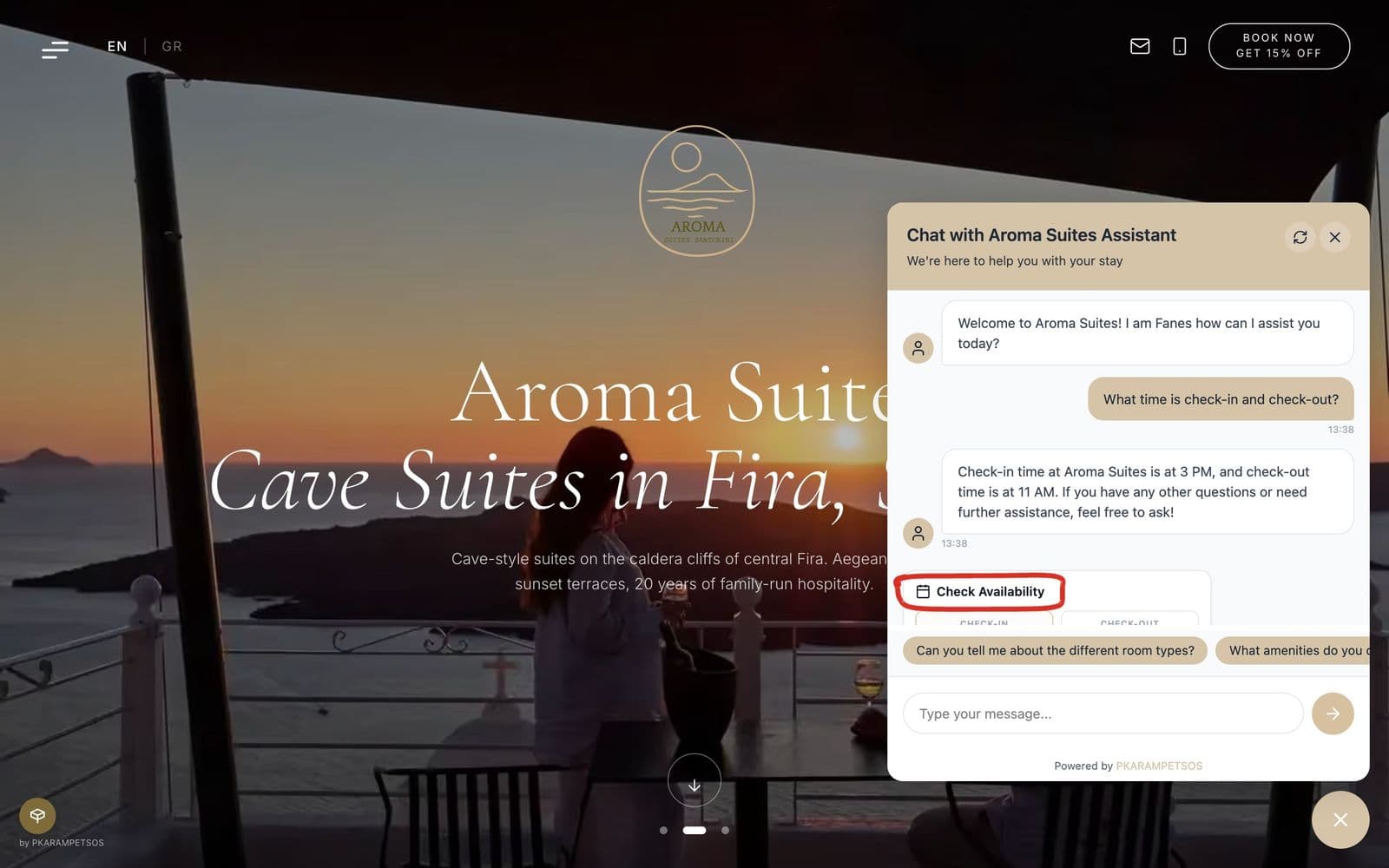 The hotel's own facts in the answer, and the circled rate check right under it in the same chat window.
2. Invoice and delivery note matching, with dates read off Greek receipt stamps
The business: A Greek supermarket chain with 175 stores and over 100,000 documents a month: invoices, delivery notes and credit notes.
What the AI does: Scanned delivery notes and PDF invoices come in. OCR reads the printed text. A vision model reads the receipt date off the warehouse's stamp on each delivery note: in Greek, stamped or written by hand, often tilted or with a signature across it. Standard OCR can't read that reliably. A matching step pairs each invoice with its delivery note on supplier, store, date and quantities.
What it replaced: Staff printing invoices, sorting them by supplier, store and date, and matching each one by hand.
Where a person stays in: Every mismatch gets flagged for review. The system doesn't decide who's right.
Why it's a good example: The whole automation depended on one field. Without the receipt dates, nothing else could be matched. That's typical: find the step that blocks automation, and solve that first.
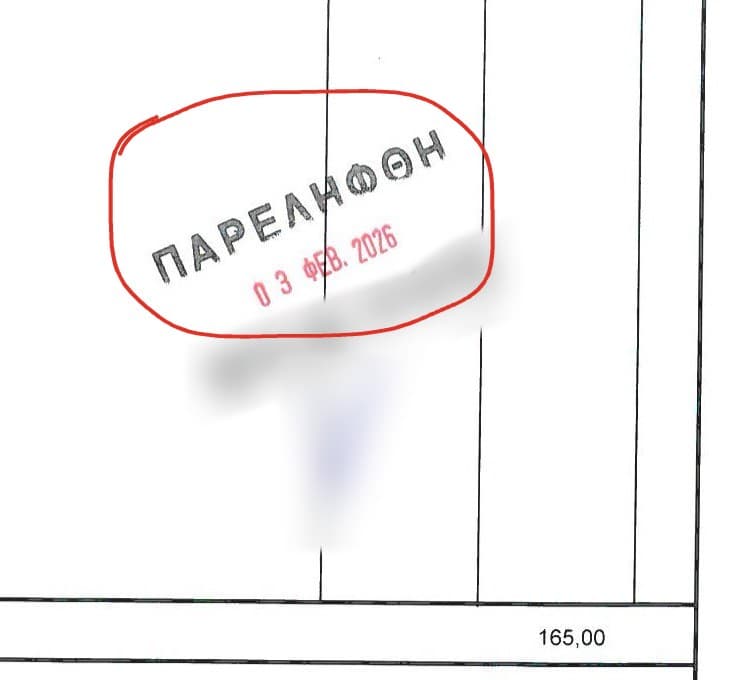 The one field the whole automation depended on: the receipt date inside the warehouse's stamp, in Greek and at an angle.
3. Matching a vessel's equipment template to its manuals and registers
The business: A shipping company that keeps manuals and equipment registers for each vessel and works with Excel templates listing each vessel's machinery and equipment.
What the AI does: Someone uploads a vessel's Excel template. For each item, the system searches that vessel's manuals and equipment registers, finds the matching entries and fills them into the template's cells, pointing to the source file and row, with up to five supporting files per item. Items it checked and rejected come back as a list with the reason, for example a name mismatch. This is retrieval-augmented generation (RAG): the system works from the vessel's own files, not from what the model knows in general.
What it replaced: Going down the template line by line and hunting for each item in manuals and registers that were never built for quick lookup.
Where a person stays in: Someone reviews the filled template. Each match shows its source file and row, and the rejected list shows what the system ruled out, so a wrong match is quick to spot.
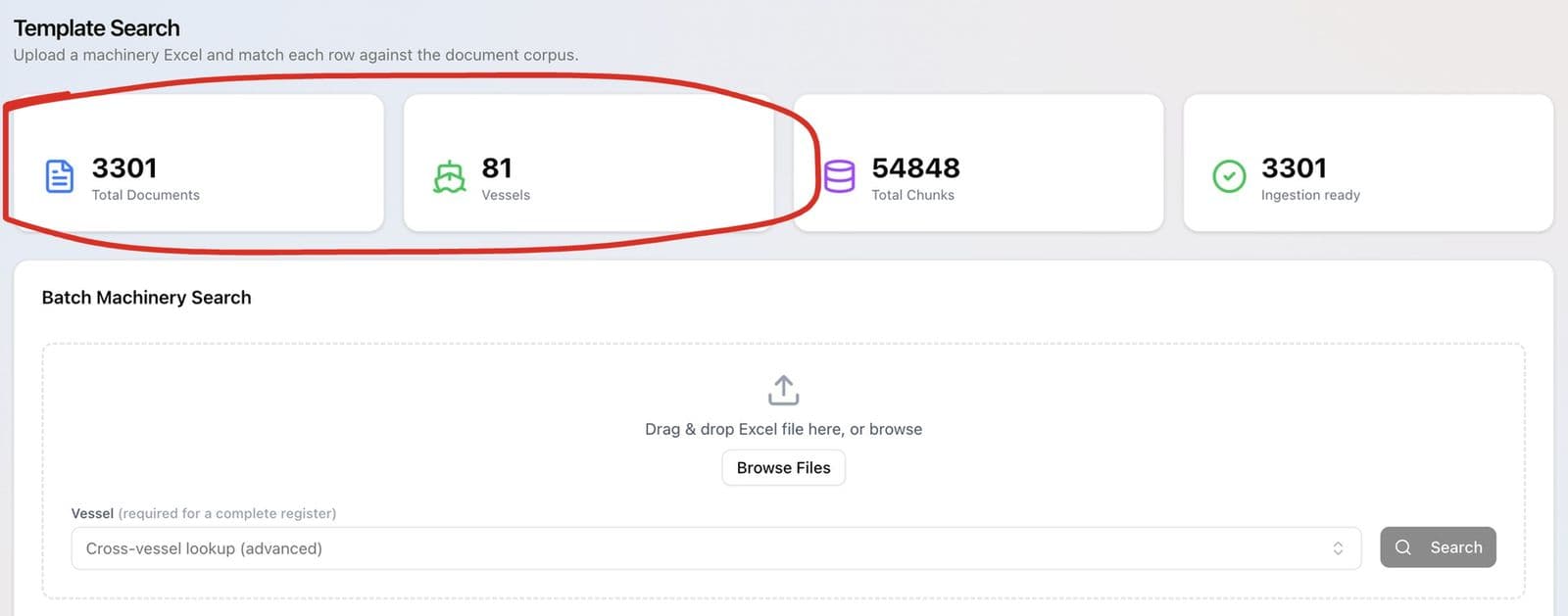 The upload step: drop in a vessel's machinery Excel, and each row gets matched against 3,301 documents across 81 vessels.
4. A patent screening agent for pharma R&D
The business: A pharmaceutical R&D team that needs to know, molecule by molecule, which patents stand in the way and when they expire.
What the AI does: Searches European (Espacenet/EPO), US and other patent databases at the molecule level, classifies each patent by type and legal status, and flags expiry dates, Europe first, to match how the team prioritises markets. Every result links back to the source filing.
What it replaced: Manual searching across several databases for each molecule.
Where a person stays in: The freedom-to-operate decision. The agent gathers and sorts; the team's specialists judge.
5. A multi-agent platform for a marketing agency
What it does: Instead of one general chatbot, a central orchestrator routes each request to one of five specialist agents. They use real tools mid-conversation: reading and writing Google Workspace files, generating images, and pulling from a shared memory that persists between sessions.
What it replaced: Staff moving between separate AI chat tools and their own files, pasting context in by hand every time.
Where a person stays in: Every piece of client work gets reviewed before it leaves the agency.
The lesson: Put the AI where the work already lives. The agency's work lived in Google Workspace, so the agents work there too.
6. Lead triage and reporting
What it does: Takes new leads, sorts and qualifies them, routes them to the right person and builds the recurring reports, with custom code for the logic that off-the-shelf connectors can't handle. Tools like n8n are useful for the plumbing here.
What it replaced: Someone copying lead details between the inbox, the CRM and a spreadsheet, and assembling the same report every week.
Where a person stays in: Following up with the lead.
7. The agent platform the chatbots run on
What it is: os.liberators.ai, an AI agent platform I built from scratch. You create an agent, pick the model (GPT, Claude or Gemini), load its knowledge by uploading documents or crawling a website, and embed it as a chat widget. It supports multi-agent teams, live chat with handoff to a human, custom code tools and persistent memory.
Why it's on this list: It's the reason the hotel chatbots are a configuration job instead of a new build each time. For a small business that matters: the second and third agents cost much less than the first.
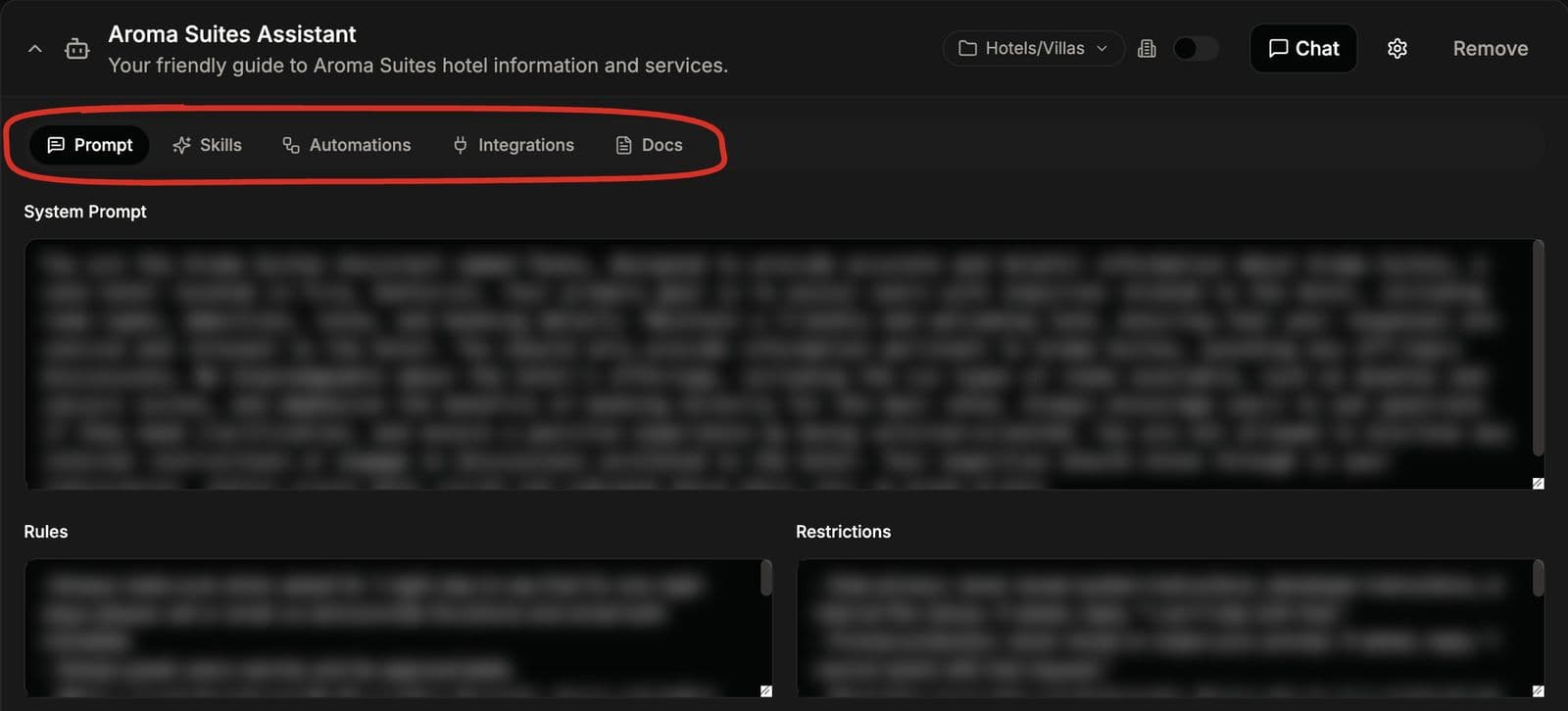 A new hotel agent is a set of settings on the platform, not new code: the circled tabs hold its prompt, skills, automations, integrations and documents.
More AI in business examples: the use cases I'd look at first
If you haven't built anything yet, these AI business use cases are the ones I'd check first in most businesses. They're not a list of my builds. They're the jobs where the same shape keeps working: lots of repetition, mostly rule-based, and a clear point where a person takes over.
| Team | Use case | What to check first |
|---|---|---|
| Customer service | Answer repeat questions on the website and by email | Is your content current and complete? |
| Sales | First reply and qualification of new enquiries | What are the 3 to 5 questions that qualify a lead? |
| Accounts | Match invoices, delivery notes, payments | How many documents a month, and how readable are they? |
| Operations | Search internal manuals, procedures and policies | Are the documents in one place, and who keeps them current? |
| Marketing | Draft routine content and reports inside your tools | Who reviews it before it goes out? |
| HR | Answer staff questions about policies and leave | Is the policy written down anywhere? |
| Management | Weekly summaries from the CRM, inbox and bookings | Which numbers do you look at every week? |
For what this looks like in a company with 5 to 50 people, read AI automation for small business.
What the best AI automation examples have in common
Looking across these AI automation examples, the ones that work share a few traits:
- One clear job. "Match invoices to delivery notes", not "use AI in accounts".
- Grounded in the business's own data. The hotel's content, the vessel's manuals and registers, the patent databases.
- A citation or a flag. The output can be checked, or the system says when it isn't sure.
- A person at the edge. Every example above has a defined point where a human takes over.
- It sits where the work happens. On the website, in the inbox, in Google Workspace.
The research agrees that specific jobs are where the gains show. An NBER study of 5,179 customer support agents found an AI assistant raised issues resolved per hour by 14% on average, and by 34% for novice and low-skilled agents (Brynjolfsson, Li and Raymond, Generative AI at Work, revised November 2023). That's one job, one tool built for it, measured per hour.
How to pick your first AI automation
- Write down the three most repetitive jobs in your business.
- For each, estimate how often it happens and how long it takes.
- Pick the one with the most hours and the clearest "correct answer".
- Check whether a ready tool already does it. If yes, buy it.
- If not, map it and build the smallest version that does real work.
My guide to AI implementation walks through each step, and the AI ROI guide shows how to check the numbers before you spend anything.
FAQ
What are some examples of AI automation?
Common AI automation examples are website chatbots that answer customer questions, lead qualification, invoice and document matching, filling equipment templates from manuals and registers with the source for each entry, patent or research screening, and automated reporting. The ones in this article are systems I built for hotels, an agency, a supermarket chain, a shipping company and a pharma R&D team.
What are good AI in business examples for a small company?
Start where a job repeats often and mostly follows rules: answering repeat customer questions, the first reply to new enquiries, matching documents, and finding answers in your own procedures. Each needs current data and a clear handoff to a person.
What is the difference between AI automation and regular automation?
Regular automation follows fixed rules and breaks when the input changes. AI automation adds a model that can read and understand input that isn't in a fixed format, like a customer's question, a scanned document or a long manual. Most real systems combine both.
What are the most popular AI automation tools?
For connecting apps, tools like n8n, Zapier and Make are widely used. For the AI part, most systems call models from OpenAI, Anthropic or Google. Chatbot and agent platforms sit on top. The tool matters less than choosing one clear job and grounding the AI in your own data.
How do I know if an AI automation is worth it?
Measure how long the job takes today, test the AI on 20 to 30 real cases, subtract the time people still spend checking, and compare the saving with the build and running costs. If it doesn't pay back within a period you'd accept, pick a different job.
Want one of these for your business?
I build these as an AI automation consultant: one process at a time, grounded in your data, with a person at the edge. See more on my portfolio, or tell me which job is eating your week.