AI ROI: How I Estimate It Before Building Anything (Worked Method)
How to estimate AI ROI before you build: the worksheet I use, a worked example with the math shown, and what the research says about real time savings.

Short answer
AI ROI is the value an AI system brings back compared with what it costs to build and run. The formula is the ordinary one:
AI ROI = (value gained - total cost) / total cost
The hard part is filling it in before the system exists. This is how I estimate AI ROI before I build anything for a client:
- Measure the job as it runs today: hours per week, errors, delays.
- Estimate the share the AI can take, after the cases that need a person.
- Subtract the time people will still spend checking and correcting.
- Put a value on the hours saved, using your own cost per hour.
- Add up every cost: build, model usage, hosting, and the time someone spends keeping the data current.
- Work out the payback period, and write down the result that would make you switch it off.
If you can't do step 1, you can't estimate AI ROI yet. Measure first.
I build AI systems for small businesses: hotel chatbots, document pipelines, a system that fills vessel equipment templates from manuals and registers, and the agent platform they run on. I don't publish savings figures for those builds here, because I don't have a measured before-and-after I can source for every one of them. What I can give you is the method, the math and the research numbers I use as a sanity check.
Why AI ROI is so hard to pin down
Big companies struggle to prove the ROI of AI too, and the numbers say so.
- IBM's CEO study (6 May 2025, 2,000 CEOs) found that only 25% of AI initiatives had delivered the expected ROI over the previous few years.
- IBM's AI ROI guide cites its Q4 2025 Think Circle report (updated 19 February 2026): 79% of executives see productivity gains from AI, but only about 29% can measure ROI confidently.
- MIT NANDA's The GenAI Divide: State of AI in Business 2025 found about 95% of generative AI pilots delivered little to no measurable impact on profit and loss, as reported by Fortune on 18 August 2025.
Put side by side, they say the same thing: people feel faster, and few can prove it in money. The gap is usually a missing baseline: nobody measured the job before the AI arrived.
What the research says about real time savings
Before trusting any estimate, including mine, compare it with independent measurements. These are the two I use.
| Study | What it measured | Result |
|---|---|---|
| Bick, Blandin and Deming, The Impact of Generative AI on Work Productivity, Federal Reserve Bank of St. Louis, 27 February 2025 | Self-reported time savings from a US worker survey | Workers who used generative AI saved 5.4% of their work hours on average, about 2.2 hours of a 40-hour week |
| Brynjolfsson, Li and Raymond, Generative AI at Work, NBER working paper 31161 (April 2023, revised November 2023) | 5,179 customer support agents with an AI assistant | Issues resolved per hour rose 14% on average, 34% for novice and low-skilled agents, with minimal impact on the most experienced |
Two lessons for your estimate:
- General AI use saves hours, not days. If your plan says a chat tool will save each employee 15 hours a week, it's probably wrong.
- Bigger gains come from specific jobs. The support study is one job, with one tool built for it, measured per hour. That's the shape of project where ROI shows up.
The AI ROI worksheet I use
This is the worksheet I fill in with a client before quoting a build. You can do it on paper.
1. Baseline: what the job costs today
Write down, for one process:
- How many times it happens per week or month
- Minutes per case, measured on real cases, not guessed
- Who does it, and what an hour of their time costs you
- Error rate, and what an error costs (a lost booking, a wrong payment, a customer who leaves)
- Delay cost, if speed matters (a guest asking at midnight who books elsewhere by morning)
2. Share of the job the AI can take
Not every case goes to the AI. Some need a person by design: complaints, refunds, judgement calls. Test the AI on 20 or 30 real cases and count how many it handles correctly without help. That share is your automation rate. Don't use a vendor's number for it.
3. Time people still spend
Someone reads the chatbot transcripts, checks the flagged mismatches, approves the output. Put that time back into the estimate. It's the line most estimates forget.
4. Value of the hours saved
Hours saved multiplied by the cost of an hour. Be honest about whether the hours turn into money. If the person saved two hours a week but nothing else gets done in those two hours, the saving is real but soft.
5. Every cost
| Cost | What goes in it |
|---|---|
| Build | Mapping the process, building or configuring, testing on real cases |
| Model usage | Tokens per case multiplied by cases per month, at the provider's published price |
| Platform and hosting | The platform, server or SaaS fee the system runs on |
| Maintenance | Someone updating the content, prices, policies and prompts |
| Review time | From step 3, if you didn't already subtract it there |
6. Payback and a kill condition
Payback in months = build cost / monthly net saving
where monthly net saving = value of hours saved - monthly running costs.
Then write the kill condition before you build: "If after three months the system saves less than X hours a month, we switch it off." I've found it's much easier to switch something off when you agreed the rule before you'd paid for it.
A worked example, with the math shown
The numbers below are example inputs to show the math. They are not results from a client project, and they are not my prices. Swap in your own.
Picture a small hotel whose front desk answers guest questions by email and website chat: check-in times, parking, transfers, breakfast.
Baseline (example inputs):
- 600 guest questions a month
- 4 minutes each on average
- 600 x 4 = 2,400 minutes = 40 hours a month
- Cost of a front desk hour: €15 (use your real figure, with employer costs)
- Baseline cost: 40 x €15 = €600 a month
Share the AI takes: say testing on 30 real questions shows the chatbot answers 60% correctly on its own. The rest go to a person.
- Hours the AI takes: 40 x 0.60 = 24 hours
- Review time still needed (reading transcripts, fixing the knowledge base): 4 hours a month
- Net hours saved: 24 - 4 = 20 hours a month
- Value: 20 x €15 = €300 a month
Model usage (real published prices): at Anthropic's API prices checked on 6 October 2026, Claude Haiku 4.5 costs $1 per million input tokens and $5 per million output tokens. Assume each conversation uses 5,000 input tokens (the bot re-reads your hotel content on each turn) and 1,000 output tokens:
- Per conversation: 5,000 x $1/1,000,000 + 1,000 x $5/1,000,000 = $0.005 + $0.005 = $0.01
- 600 conversations: about $6 a month
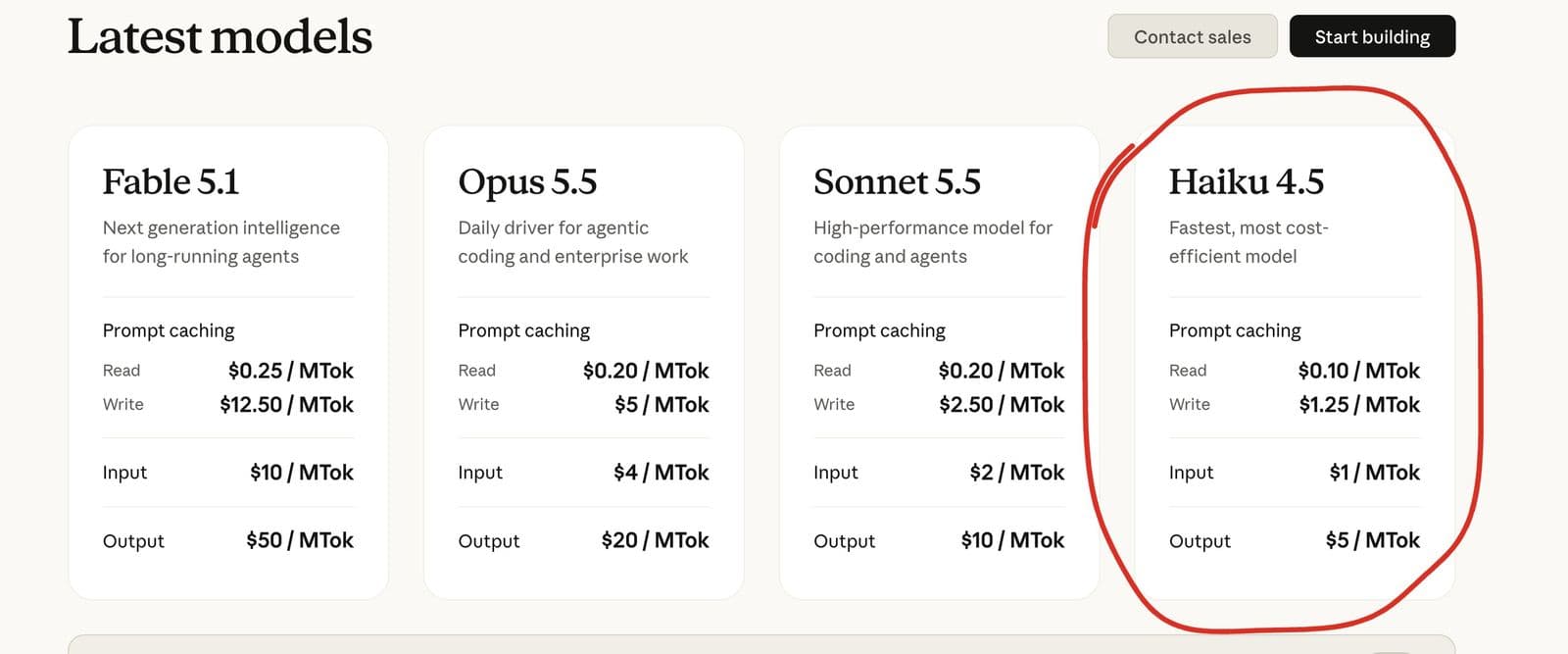 The two prices the model line rests on, on Anthropic's public pricing page on 6 October 2026. Check the page again when you run your own numbers: prices change.
Add the platform or hosting fee, say €40 a month in this example.
Monthly net saving: €300 - €6 - €40 = about €254
Payback: divide the build cost by the monthly net saving. I find it easier to count the build cost in months of savings instead of euros. If the build costs as much as 10 months of savings, it pays back in 10 months:
| Build costs as much as | Pays back in | ROI after 24 months |
|---|---|---|
| 6 months of savings | 6 months | (24 - 6) / 6 = 300% |
| 12 months of savings | 12 months | (24 - 12) / 12 = 100% |
| 24 months of savings | 24 months | 0%, it only breaks even |
The ROI column uses the formula from the top of this guide. Two years of running brings in 24 months of net savings. Take away what the build cost, then divide by it. To find your row, divide the quote in front of you by your own monthly net saving.
Three things jump out of this example:
- The model cost barely matters. At these volumes, tokens are a rounding error next to the build and the review time.
- The automation rate decides almost everything. At 30% instead of 60%, the AI takes 12 hours instead of 24, but the 4 hours of review and the running costs stay the same. The net saving falls from about €254 to about €74 a month, and the payback takes more than three times as long. That's why I test on real cases before quoting anything.
- The hours alone might not justify it. For a hotel, the bigger argument can be the booking that doesn't get lost at midnight. That's worth counting, separately.
Returns that don't fit the hours formula
Some of the value is real but shouldn't go straight into the ROI number, because you can't measure it upfront. I list these next to the estimate, not inside it.
- Response at hours when nobody's working. The hotel chatbots I run on Aroma Suites, Casa di Terra Villa and Amoopi Nymfes answer at any hour. Whether that turns into bookings is something you measure after launch, from the conversations and the booking data.
- Fewer errors. For a Greek supermarket chain with 175 stores and over 100,000 invoices, delivery notes and credit notes a month, the case for automated matching isn't only hours. A mismatch caught early is a payment dispute that never happens.
- Faster, checkable work for specialists. For a shipping company, matching each item in a vessel's equipment template to its manuals and registers saves someone hunting for entries item by item. The value is time, but also confidence: every match shows its source file and row, and the rejected ones come with a reason.
- Staff doing better work. The NBER support study found the biggest gains among newer staff. An AI system can make a new hire productive sooner.
If you want to count any of these, pick one number you can track after launch (bookings from chat, disputes per month) and measure it.
Where AI ROI disappears
These are the places I see estimates go wrong.
Automation rate from a demo. Demos use clean examples. Your inbox doesn't.
Forgetting review time. An AI that saves 20 hours but needs 15 hours of checking saves 5.
Nobody maintains the data. Prices change, policies change. A bot quoting last year's rates costs you more than it saves.
The system sits outside the workflow. If people have to open a separate tool, they stop using it and the saving goes to zero.
Scope creep. "While we're at it, can it also..." Every addition belongs in its own estimate.
Model choice. Picking the most expensive model for a simple job can multiply running costs. Test the cheaper model first.
How I measure AI ROI after launch
The estimate is a prediction. After launch I compare it with what actually happens:
- Volume handled: how many cases the system processed
- Automation rate: what share it finished without a person
- Review time: hours people spent checking
- Errors: mistakes caught, and mistakes that got through
- Running cost: the real token and hosting bill
- The one business number tied to the job: bookings from chat, disputes, response time
After three months, compare it with the kill condition you wrote down. Keep it, fix it, or switch it off.
An AI ROI calculator you can use now
You don't need a tool for this. Put your numbers into these five lines:
- Hours per month = cases x minutes per case / 60
- Hours saved = hours per month x automation rate - review hours
- Monthly value = hours saved x cost per hour
- Monthly net = monthly value - model cost - platform cost
- Payback months = build cost / monthly net
If line 4 is negative or line 5 is longer than you'd wait, don't build it. Or pick a different process. My guide to AI implementation explains how to choose one, the AI automation examples show the kinds of jobs I build, and AI automation for small business covers which of them make sense at small scale.
FAQ
What is AI ROI?
AI ROI is the return an AI system brings compared with its total cost. You calculate it as value gained minus total cost, divided by total cost. Value is usually hours saved, errors avoided or revenue kept. Cost includes the build, model usage, hosting and maintenance.
How do you calculate AI ROI before building?
Measure the job today in hours and errors, test the AI on 20 to 30 real cases to find the share it handles correctly, subtract the review time people still need, value the hours saved at your cost per hour, and divide the build cost by the monthly net saving to get payback.
Is a 40% ROI good for an AI project?
It depends on the time it takes and the risk. A 40% return over two years on a small, low-risk automation is reasonable. Payback period is often more useful for small businesses: how many months until the build has paid for itself.
Is AI actually turning a profit for businesses?
For some, not most yet. IBM's 2025 CEO study found only 25% of AI initiatives had delivered the expected ROI, and MIT NANDA's 2025 research found about 95% of generative AI pilots had little to no measurable P&L impact. Specific, measured jobs do better than broad rollouts.
How much time does AI actually save?
A St. Louis Fed study published in February 2025 found workers using generative AI saved 5.4% of their work hours on average, about 2.2 hours a week. A study of customer support agents found 14% more issues resolved per hour. Gains are bigger on specific, repeated jobs.
Is there an AI ROI calculator?
You can use five lines: hours per month, hours saved after review, monthly value, monthly net after running costs, and payback months. The worked example in this guide shows each step with the math.
Want a second opinion on your numbers?
If you've got a process and a rough baseline, I'll go through the estimate with you and tell you honestly whether it's worth building. That's the first thing I do as an AI automation consultant. For hotels, my hotel chatbot guide covers the chatbot side in detail. Or send me the process and your numbers.