How to Get My Website on Google: The Checks I Run When It Won't Show Up
How to get my website on Google: Search Console, sitemap, the noindex and robots checks, and why three of my own new pages were still unknown to Google.
Short answer
How to get my website on Google? Add it to Google Search Console, verify you own it, submit your sitemap, and use URL Inspection to request indexing for your most important pages. Then wait: Google decides when to crawl and whether to index, and it can take days to weeks. If your website isn't showing on Google after that, the cause is almost always one of five things, and you can check all five yourself in about half an hour.
I'll walk you through them in the order I check them on client sites, and show you what happened with three pages on my own site that Google still didn't know about five days after I asked it to look.
How to get my website on Google: start with a site: search
Search Google for site:yourdomain.com. If you see your pages, Google has them in its index, and your problem is ranking, not indexing. If you see nothing, or only the homepage, keep reading.
The site: search is a rough count, not an exact one. Search Console, below, gives you the real answer page by page.
Step 1: Add your site to Google Search Console
Google Search Console is free and it's the only place Google tells you, in its own words, what it thinks of each page.
- Add a property. A Domain property covers every version (http, https, www, subdomains), but needs a DNS record. A URL-prefix property is easier to verify with an HTML file or tag.
- Verify ownership. The DNS route takes five minutes longer and survives a redesign.
- Open the Pages report a few days later. It lists what's indexed and, for everything else, the reason.
When I set up Search Console for Kokos Rental, a car rental in Chania, Google knew 24 of its URLs and had indexed only 7. Nobody had looked before, so nobody knew.
Step 2: Submit your sitemap
A sitemap is a file that lists the URLs you want Google to find. Most platforms make one for you: WordPress with Yoast or Rank Math at /sitemap_index.xml, Next.js sites usually at /sitemap.xml, Shopify at /sitemap.xml.
In Search Console, go to Sitemaps, paste the URL and submit. Also add one line to your robots.txt, Sitemap: https://yourdomain.com/sitemap.xml, so every search engine finds it. Google's sitemap guide covers the formats.
A sitemap helps discovery. It doesn't force indexing.
Step 3: Request indexing for the pages that matter
In Search Console, paste a URL into the search bar at the top. That's the URL Inspection tool. It tells you if the page is indexed, when Google last crawled it, and which canonical it picked. If it isn't indexed, click Request indexing.
Do it for the pages that make you money: home, services, contact, your best articles. You don't need to do it for every URL. There's a daily limit, and the sitemap plus internal links carry the rest.
Step 4: Rule out the five usual causes
When a website isn't showing up on Google, it's almost always one of these. Check them in this order.
Is a noindex tag telling Google to stay out?
A <meta name="robots" content="noindex"> tag, or an X-Robots-Tag: noindex header, tells Google not to index the page. The most common source: WordPress's "Discourage search engines from indexing this site" box, ticked during development and never unticked. URL Inspection shows it as "Excluded by 'noindex' tag". Google explains the tag in its noindex documentation.
Is robots.txt blocking the crawler?
Open yourdomain.com/robots.txt. A line Disallow: / under User-agent: * blocks the whole site. Builders and security plugins sometimes add this. Note the difference: robots.txt stops crawling, noindex stops indexing. A page blocked in robots.txt can't even show Google its noindex tag.
Does the page have a canonical pointing somewhere else?
A canonical tag says "the real version of this page is over there". If every page's canonical points to the homepage (a common theme bug), Google indexes the homepage only. URL Inspection shows "User-declared canonical" and "Google-selected canonical". If they differ, find out why.
Is the page a duplicate or too thin?
If two pages say nearly the same thing, Google indexes one. On Kokos Rental, Google wouldn't index one car page, most likely because it was nearly identical to a newer sibling. In Search Console this shows as "Crawled, currently not indexed" or "Duplicate without user-selected canonical". The fix is to make each page clearly different, or merge them.
Is anything linking to the page?
Google finds pages by following links. A page that no other page links to (an orphan) gets found late, if at all. On 1 October 2026 two of my own articles weren't indexed (one "Crawled, currently not indexed", the other never crawled). I added links to both from my homepage, so Google would come across them from a page it already crawls often.
Step 5: Know what not to rely on
Two things people try that don't do what they hope.
The Indexing API is not for normal pages. Google's Indexing API is fast, and plenty of tools use it for blog posts. But Google's own documentation says it's only for pages with job postings or livestream videos.
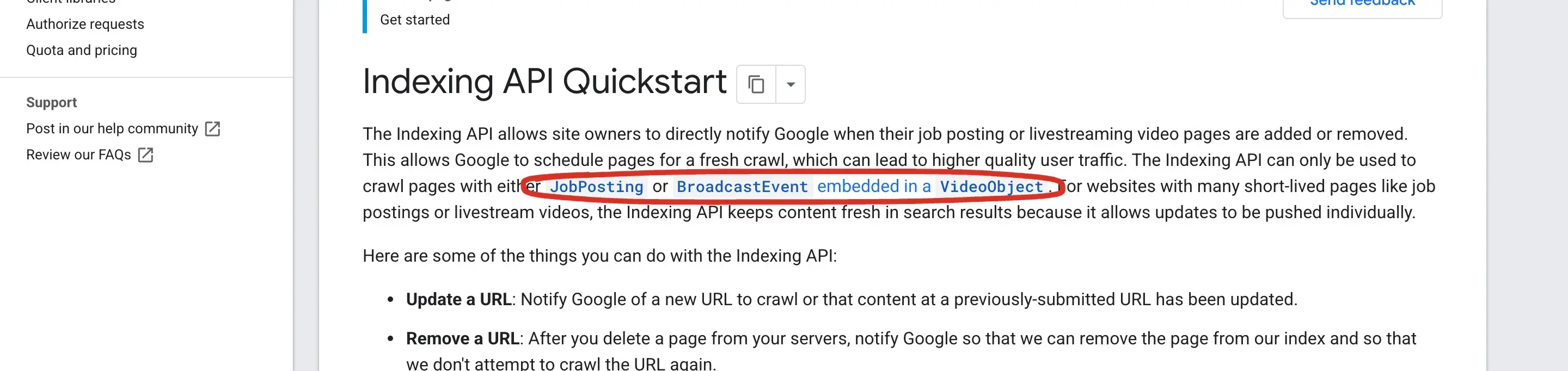 The Indexing API Quickstart, opened 7 October 2026. The circled part limits the API to job posting and livestream pages. For everything else, Search Console and links are the supported route.
My own data agrees. I published three new pages on 1 and 2 October 2026 and submitted them through the Indexing API, which accepted the request. On 5 October, and again when I checked on 7 October, URL Inspection reported all three as "URL is unknown to Google". The API said yes; Google hadn't crawled them. Google crawled two of them later that same evening and the third on 15 October, and by 17 October all three were indexed. Since then I read the API's yes as a ping, not as proof. What tells me a page is in is URL Inspection.
Paying Google doesn't help either. Google says it doesn't accept payment to crawl a site more often or rank it higher, and that it doesn't guarantee to crawl, index or show any page.
 From How Google Search works, 7 October 2026. Anyone who promises indexing by a date is promising something Google itself doesn't.
For Bing and other engines, IndexNow is the equivalent ping, and Bing supports it. I send every new URL through it as well.
Indexed but not showing: the next problem
Once your pages are indexed, "not showing on Google" usually means they rank too low for anyone to see. That's a different job:
- Search for your exact business name. If you don't show for that, something is still wrong technically.
- Check what you rank for in Search Console's Performance report. My own site had 121 impressions in the week of 19 to 25 September 2026, and 117 of those landed on a single article. Impressions come before clicks, and they show you which pages Google tests.
- Fix the basics: titles, speed, structured data, internal links. My technical SEO checklist has the full list, and WordPress speed optimization covers the speed side.
- Local business? The map listing matters as much as the site. That's the Google Business Profile, covered in local SEO for small business.
After a redesign: the most common way to disappear
If your site dropped out of Google after a new site went live, the old URLs probably return 404. When Aroma Suites relaunched in March 2026, Search Console listed 54 old URLs as 404 a couple of days later, addresses Google was still crawling from the old site. I added 15 more 301 redirects that day. My guide to website redesign SEO covers the whole process, so you can do it before launch instead of after.
FAQ
How do I put my website on Google for free?
Add it to Google Search Console, verify it, submit your sitemap and request indexing for your main pages with URL Inspection. All of it is free. Google doesn't charge to index or rank a site.
How long does it take for a new website to show up on Google?
From a few days to a few weeks for the first pages. Google decides when to crawl. Links from sites Google already visits, and a sitemap, shorten the wait.
Why is my website not showing on Google when I search for it?
Check, in order: a noindex tag, a robots.txt block, a wrong canonical, duplicate or thin pages, and pages no other page links to. URL Inspection in Search Console tells you which one applies.
Does it cost money to get my website on Google?
No. Google doesn't accept payment for crawling or ranking. Ads are a separate, paid product and don't affect organic results.
Can I make Google index my site faster?
Only within limits: submit a sitemap, request indexing for key pages and link to new pages from pages Google already crawls. The Indexing API is officially for job postings and livestreams, and for the three new pages I tested in October it didn't speed anything up.
Working with me
I'm Panagiotis Karampetsos, a developer and SEO based in Heraklion, Crete. If your site isn't on Google and the checks above don't explain why, send me the URL and I'll tell you what's blocking it.