Grok Bot for Business: What It Does, What It Costs, Where It Stops
What xAI's Grok Bot does, what it costs through Cursor, where it stops for a small business, and how I decide between it and a custom AI agent system.

Short answer
Grok Bot is xAI's AI agents platform: you give a bot a name, message it like a colleague, and it works on its own cloud computer, even after you close the laptop. Access comes with every paid individual Cursor plan, and Cursor Pro is $20 a month. My rule is short: Grok Bot for personal, repetitive work on web tools, a custom system when the work touches your own data and systems.
I build AI agent systems for businesses. When a product like Grok Bot ships, I read it with one question in mind: which of the things I build custom today can a subscription tool now do, and where does it stop? This article is the answer, written for business owners rather than developers.
If your only question is what is Grok Bot, xAI's own page answers it in one line. What it won't tell you is where Grok Bot stops for a small business, and whether someone who builds the alternative would pay $20 a month for it. That's what this article is for.
One thing to clear up first. Grok Bot is a separate product from xAI: named AI agents that work on their own computer in the cloud and run tasks in the background. It isn't the Grok you open at grok.com to ask a question.
I've been running Grok Bot since the end of August 2026: a coordinator bot I call Chief of Staff, a roster of specialists for video, content, news and outreach, and two routines that fire on their own every day. The screenshots below are from my own account. What follows is the official documentation checked against that, read by someone who builds the alternative for a living. Where I'm still guessing, I say so.
TL;DR
- Grok Bot is xAI's AI agents platform. You give a bot a name, message it like a colleague, and it works on its own cloud computer, even after you close the laptop.
- Access comes with every paid individual Cursor plan and with Cursor Teams. Cursor Pro is $20 a month. You can link a SuperGrok subscription instead, which is $30 a month.
- The docs put its strength in repetitive work inside web apps: Routines that run on a schedule or a trigger, Teach a task, where you show it a process once, and approvals that call you in whenever a password or a payment is involved.
- For a small business the limits are real. Your data passes through someone else's cloud computer, and your ERP or booking engine is rarely a web app with an API. The only way in is a developer subscription.
- My rule is short. Grok Bot for personal, repetitive work on web tools. A custom system when the work touches your own data and systems.
What is Grok Bot (and why it isn't the Grok you know)
xAI (its docs now carry the SpaceXAI name) launched Grok Bot in late August 2026. The official Grok Bot page calls the bots "AI teammates": persistent bots with names, which you keep around and hand work to with a message, the way you'd brief a colleague.
The difference from a chatbot shows up on the first task you give it. A chat model answers and stops. A Grok Bot takes the instruction, opens a browser, writes files, runs commands in a terminal, and comes back with a result. Every account gets one shared computer in the cloud with a browser, a file system and a terminal on it.
That's where your bots live.
For apps that have an API or a connector, the bot uses them directly. For apps that don't, it uses computer use: it looks at the screen and clicks, the same as a person sitting at it. The docs mention connectors for email and calendar in general terms. The marketplace in my account is more specific, and I show it further down.
There are desktop and mobile apps (iOS 18 and up, Android 9 and up). The work doesn't run on your device, though. It runs in the cloud and keeps going after you close the app or the laptop, which is the part that separates it from anything you've tried inside a chat window.
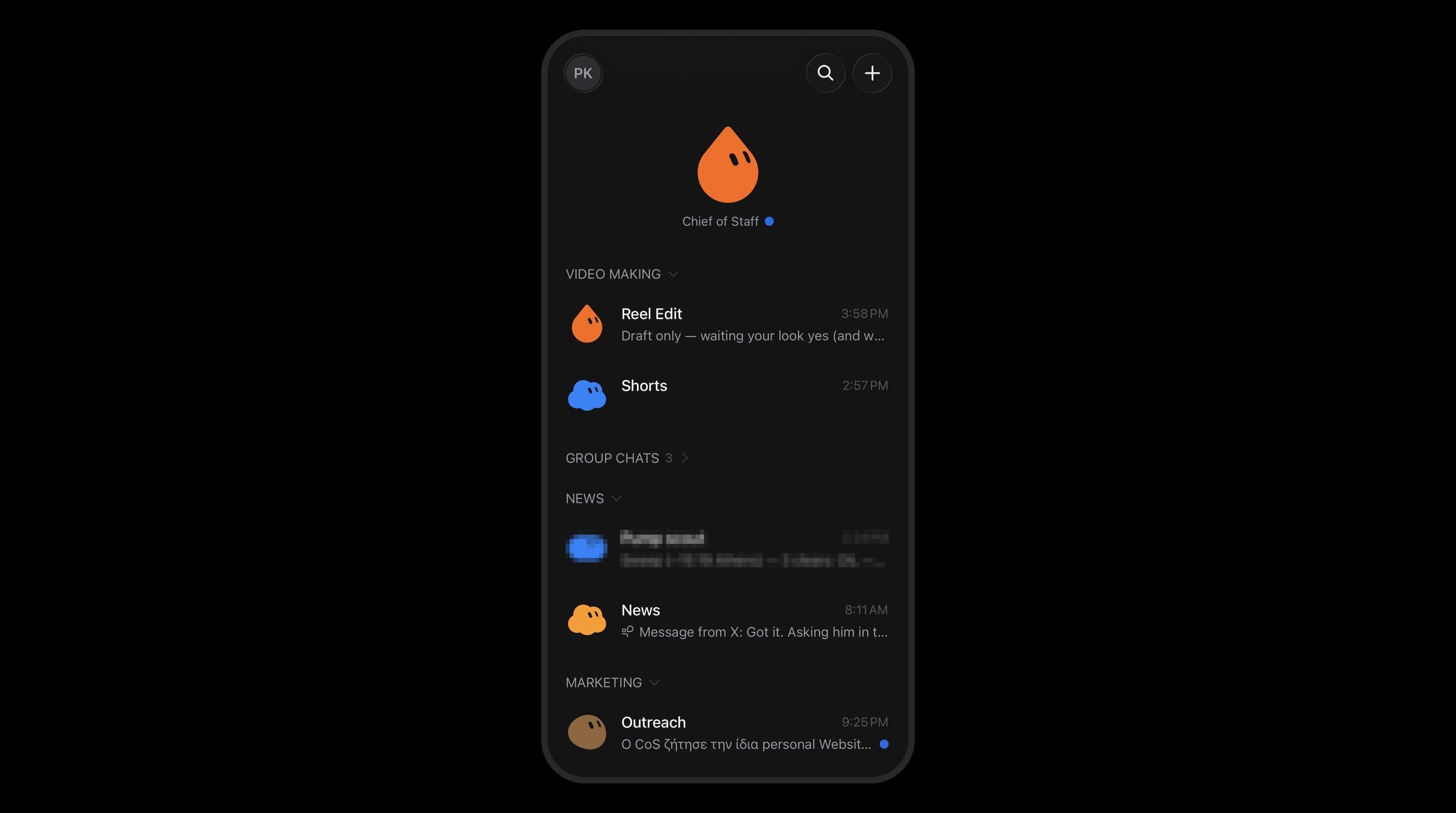 The same roster on my phone. The work runs in the cloud, and the phone is one more window onto it.
How Grok Bot works
Of everything the docs describe, four things held my attention as a builder, and the rest is detail. One note before the four: the docs describe them, and my own account shows them in use, so you get both.
A computer of its own
The bot isn't pretending to do something. It works on a real machine in the cloud. Ask it to collect figures from three websites and put them in a file, and it opens the pages, reads them, writes the file. You can watch, or go do something else. You can also run several bots at once, and according to the docs they coordinate with each other. In my setup a Chief of Staff bot hands work to the specialists and reports back in group chats, one per desk.
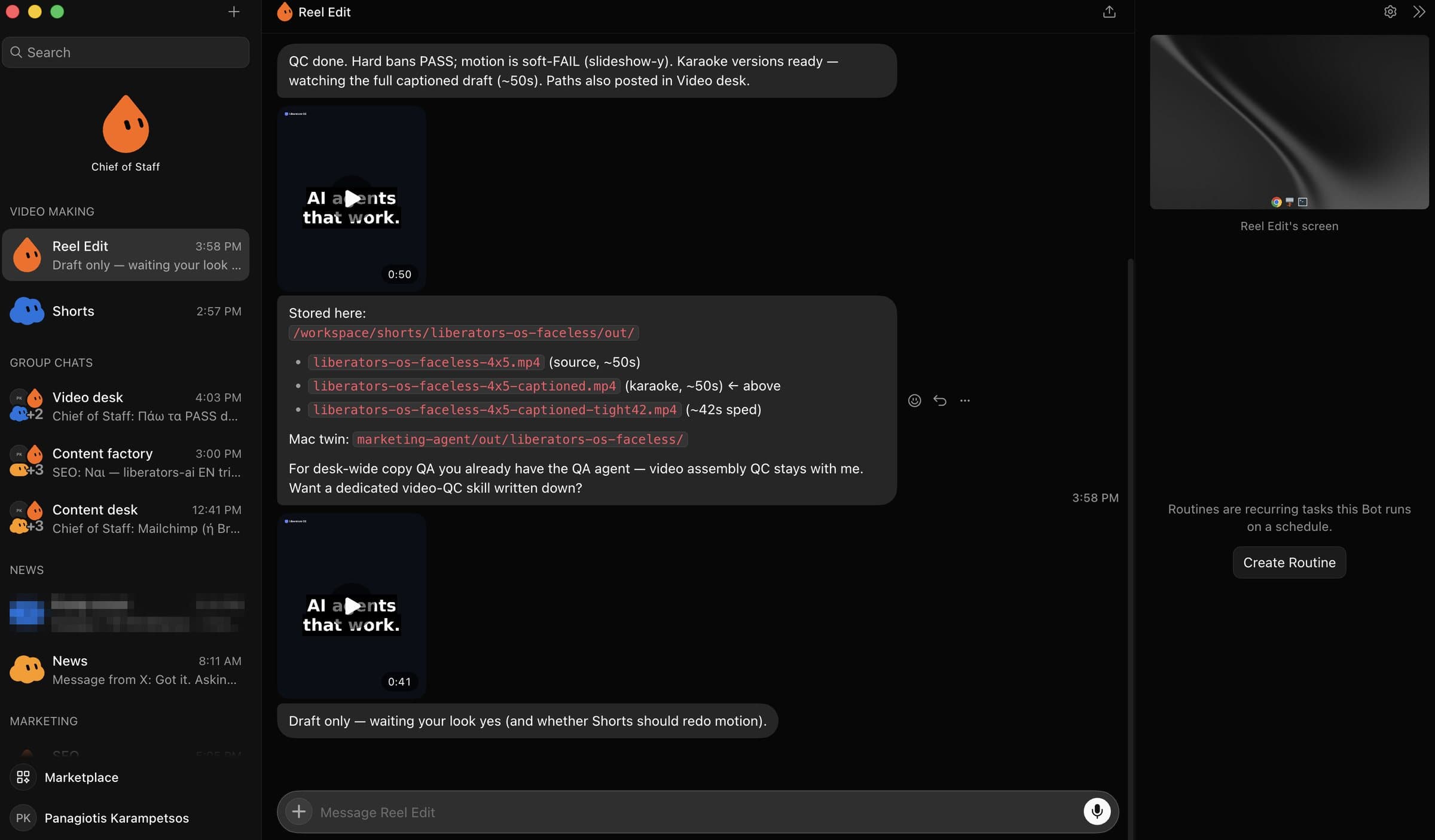 My roster on a Tuesday afternoon: a Chief of Staff, two video bots, three group chats, news and marketing bots. The panel on the right is the bot's own screen.
Routines: work on a schedule or on a trigger
Routines are the part a business should care about most. You define a task to run at a set time, or when something happens. Event triggers come from the integrations on your Cursor account. The docs name a Slack message and a GitHub notification as examples.
It's the employee who checks something every Monday morning and sends you a summary without being reminded. If you've read my n8n automation ideas for service businesses, you'll recognize the pattern: schedule, trigger, action. The new part is that a model with a browser does the action. No fixed chain of nodes. In my account a keep-alive routine has run every evening since August 30 with a check mark on every run, and a second one drafts SEO content on a monthly schedule. That's a small sample and a simple job. It's still more than the docs can tell you.
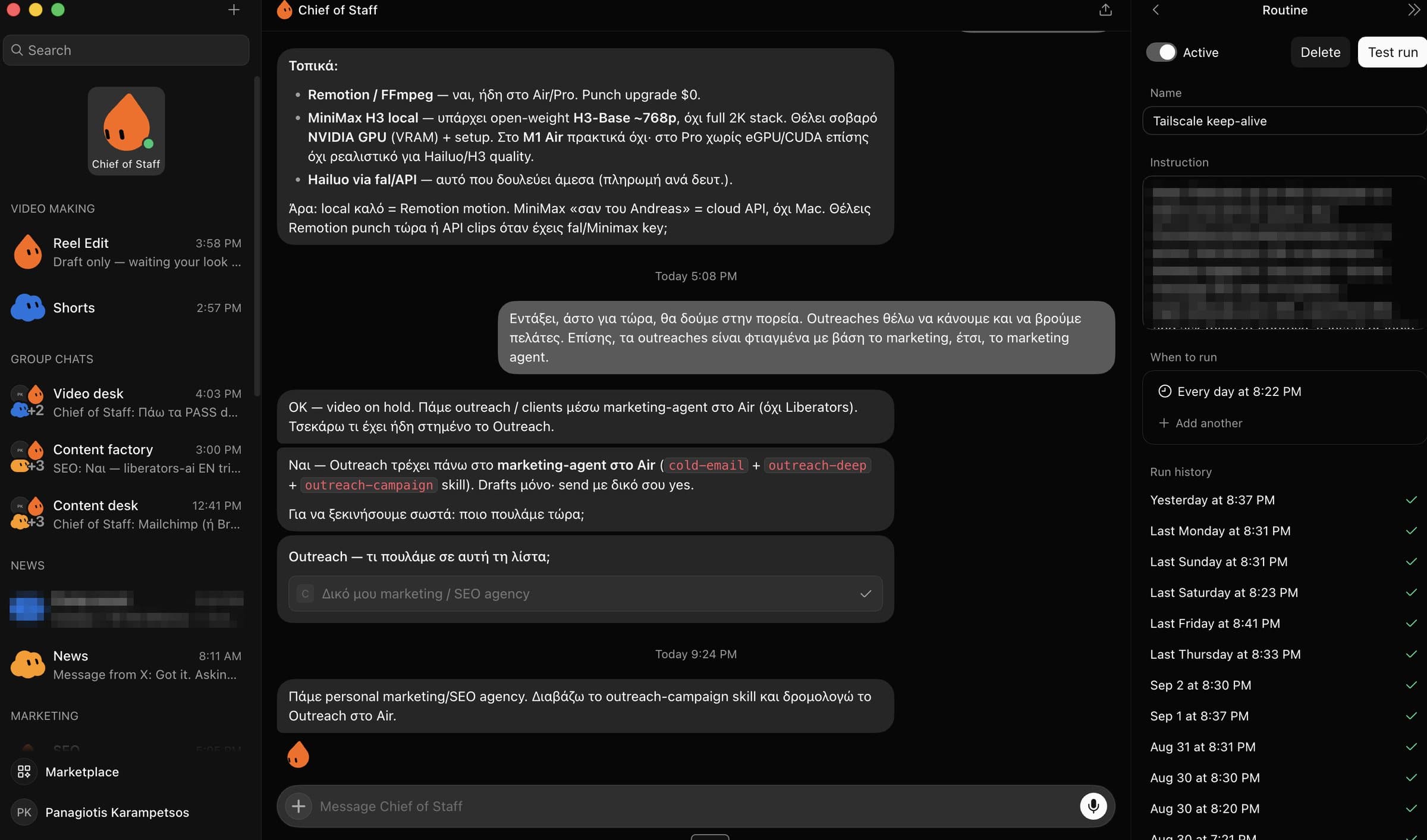 A routine that runs every day at 8:22 PM. The run history is the part I check, and so far every run has a check next to it.
Teach a task: you show it instead of explaining it
This is the smartest piece of the design. Instead of describing a browser process in words, you do it once in front of the bot. It records the steps, saves them, and reruns them when you ask. It isn't available on mobile. I've used it to show a bot around my own platform, os.liberators.ai, while it watched from its own screen. It's the feature I'd envy as a builder.
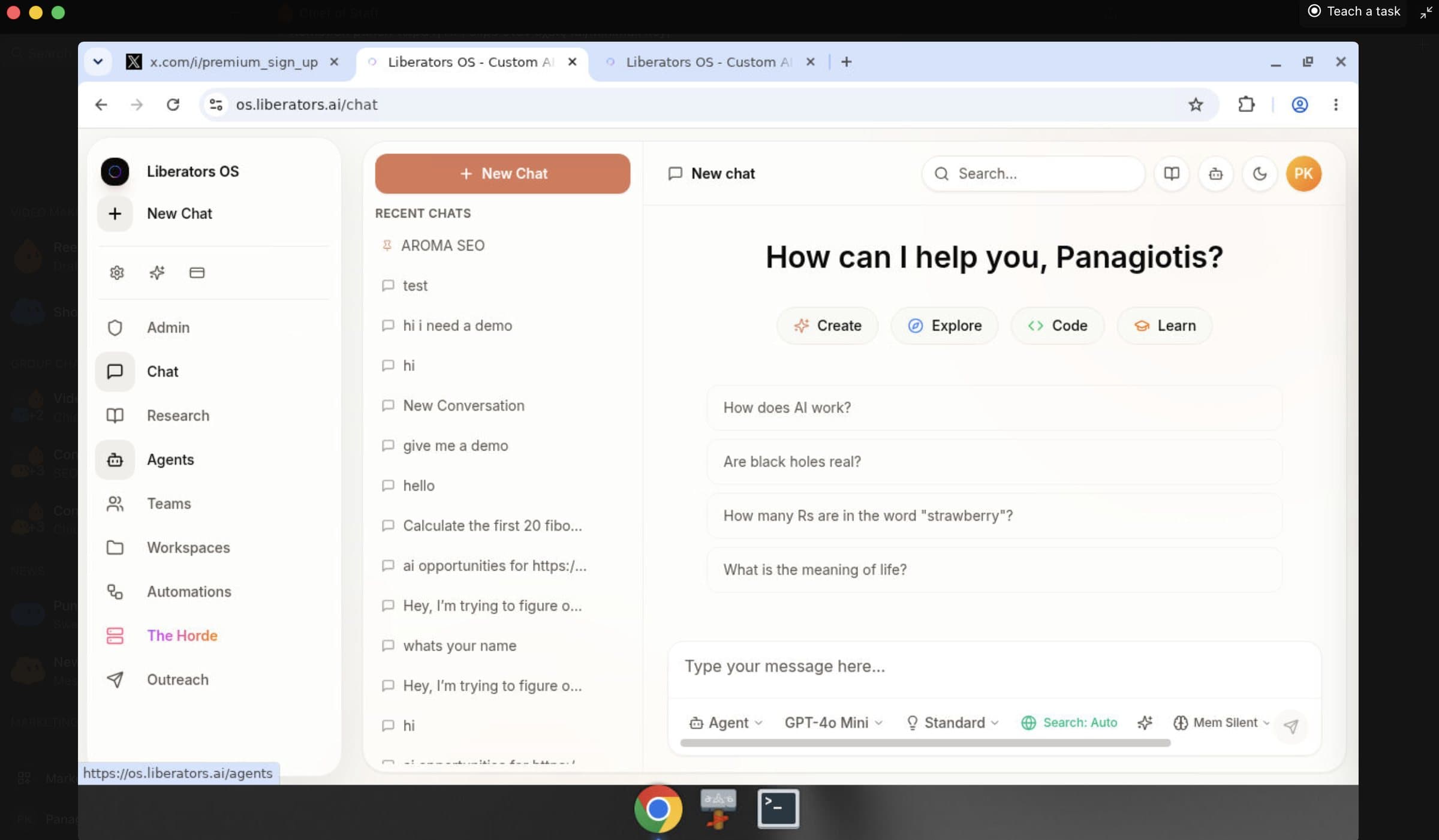 Teach a task: I click through my own platform once, the bot watches from its screen, and the path is saved for next time.
Anyone who has tried to write instructions for a back-office process knows why this matters. Most internal procedures aren't written down anywhere. They live in one person's hands. A tool that watches those hands is worth more than a tool that reads a manual, because there is no manual.
Approvals: it stops and asks you
The bot stops and asks for you whenever it hits passwords, passkeys, two-factor codes, CAPTCHA, payments, identity checks, or a site that requires a human. You take over the shared computer, do the step, and hand it back.
Read that as a limitation if you like. I read it as the most correct design decision in the product. An agent that pays on its own or passes two-factor codes on its own is a security hole somebody will eventually pay for. In the systems I build, a human approves anything that touches money or access. It's good that xAI landed in the same place.
There's also a marketplace with plugins and packaged skills. Mine shows Gmail, Google Drive and Slack added, with Google Calendar, Notion and Granola one click away, plus a set of team plugins. So the connectors are real, and they lean toward the SaaS stack a US startup runs on.
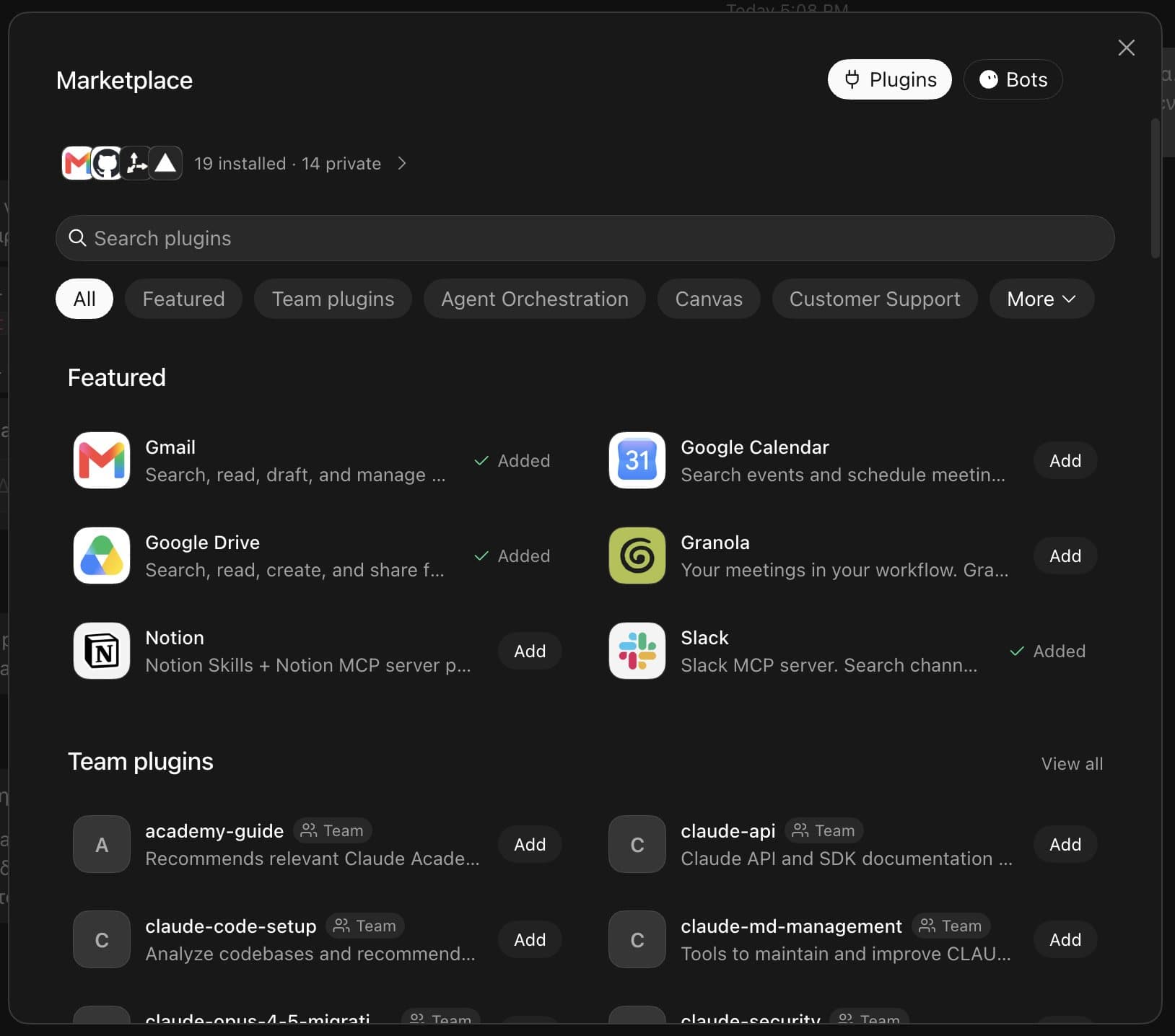 The marketplace on my account. Gmail, Drive and Slack are added. Notice what isn't here: any Greek ERP or booking engine.
Grok Bot pricing: Cursor, SuperGrok and what you're buying
Grok Bot pricing is the first surprise for anyone who isn't a developer. There is no Grok Bot subscription. Access, according to Cursor's plans page for Grok Bot, is included on every paid individual Cursor plan and on Cursor Teams.
Cursor is a code editor. Its cheapest paid plan, Cursor Pro, costs $20 a month according to Cursor's pricing page. Or you can link an individual SuperGrok, SuperGrok Plus, SuperGrok Heavy or X Premium+ subscription. SuperGrok is $30 a month according to xAI's pricing page.
Two things to keep in mind:
- Every plan has weekly usage caps. I'm not quoting numbers because they change. Ask before you pay.
- Prices are in US dollars. If you run a business in Greece or anywhere else in the EU, add VAT and the exchange rate to your sums.
So for $20 a month you buy a developer tool and get Grok Bot with it. If you don't write code, you're paying for something you won't use to get something you want. It's cheap. It also tells you who xAI had in mind as the first user, and it wasn't a hotel owner.
Grok Bot vs custom AI agents
Grok Bot vs custom AI agents is the question I can answer with the most confidence, because the second half of it is my job. I build systems like os.liberators.ai, a private AI agents and chatbot platform for a company, running on its own data. I've built AI chatbots on hotel websites that handle booking inquiries, a system that matches invoices to delivery notes for a supermarket chain, with OCR that reads receipt dates off delivery-note stamps, stamped or handwritten, and a five-agent campaign platform for an advertising agency. The samples are in the portfolio, under AI Agents.
| Grok Bot | Custom AI agent system | |
|---|---|---|
| Where it runs | On a computer in Cursor's cloud | Wherever you decide: your own server or the cloud of your choice |
| Your data | Passes through a third party | Stays in your systems |
| ERP, booking engine, accounting | Connectors where they exist, otherwise computer use through a browser | Direct connection to the API or the database, built for your case |
| Your documents and procedures | Undocumented for Greek back offices | Tested on your own documents before it goes live |
| Who uses it | One person with a Cursor account, or a team on Cursor Teams | Your team, with roles and permissions you define |
| Starting cost | From $20 a month (Cursor Pro) | A project with a budget, sized to the scope |
| Time to first result | Right after you subscribe | Weeks, depending on the scope |
| Where it fits | Personal, repetitive work in web apps | Work that touches your own data, customers and money |
If you only look at the cost row, you miss the point of the table. The real difference is who knows your business. Grok Bot is a capable generalist working out of someone else's office. A custom system is an employee who knows your business because you trained it on exactly that.
For most office work, to be fair, the generalist is enough. Not everyone needs a custom system, and anyone who tells you otherwise is selling something. Me included.
Where it stops for a small business
The English guides I've read about the xAI Grok Bot are written for US startups that live inside SaaS tools. A small business in Greece looks different, and it's the case I know.
Your ERP isn't a web app. The docs describe connectors, MCP and computer use on applications. An accounting package running on a Windows PC in the office, or a reservations system with a back office and no API, isn't the case they had in mind. On paper, computer use covers apps without an API. In practice, a back office with CAPTCHA, two-factor codes and pages that change layout means approvals, constantly. Expect the bot to call you every few minutes.
Your data leaves. Everything the bot does, it does on a computer in Cursor's cloud, according to xAI's own documentation. For it to work on your quotes or your invoices, those have to pass through there. For some businesses that's acceptable. For an accounting firm or a clinic, it's the first question to answer, before anything else.
Greek documents. My bots and I talk in Greek all day, and the model has no trouble with it. What I haven't tested is the other half: whether a computer use agent reads a Greek back office or a PDF invoice from a Greek supplier correctly. That needs a real test, and I'm not going to assume it. I'd say the same about any language other than English.
One account, one person. Access is tied to an individual Cursor plan or to Cursor Teams. If you want three employees sharing bots, each with different permissions, you're in developer-team territory, which is not how a service business is organized.
The subscription is for developers. I'm repeating it because it's easy to skip past. Nobody sells you Grok Bot on its own: you buy Cursor, and Grok Bot comes with it. The hotel owner who opens Cursor for the first time will see a code editor.
When Grok Bot isn't worth it
Some cases are clear. If you recognize yours, don't spend the $20.
- Your process doesn't work with humans either. I say this about every tool: AI on a broken process is wasted money. A bot that runs a confused workflow faster produces confusion faster.
- The work passes through money or customers' personal data. Approvals will stop you at the right moment, but then what have you gained? That work needs a system with controls you designed.
- You're looking for something that talks to customers. Wrong category. Grok Bot works for you, in the background, and has nothing to do with the chatbot on your website. For that, I've written a full guide to AI chatbots for hotels, and if the website itself needs rebuilding first, here's what a hotel website costs in 2026.
- Nobody on the team will sit down and learn it. It's a tool that needs one person to "teach" it and check its results. Without that person, it becomes one more subscription that got forgotten.
- One or two simple triggers. If your problem is solved by "when a form comes in, send an email", you don't need an agent with its own computer. A two-step automation is enough.
How I decide
The rule I use when someone asks me about AI agents for business, not only Grok Bot, has two parts.
Part one: if the work is personal, repetitive, and happens in web apps, try the ready-made tool. Market research, collecting figures from websites, preparing material before a meeting, keeping an eye on competitors, cleaning up lists. xAI's own use cases say the same: its team uses the bots for outbound sales, demo prep, pipeline management and account follow-ups. All of those are one person's work on web tools. That's where Grok Bot makes sense, and $20 a month is small money against the hours you'd save if it does work.
Part two: if the work touches your own data or your own customers, you need a system, not a tool. I keep saying it: stop collecting AI tools, build systems. A system knows your booking engine, your accounting package, the way you write quotes, which customers pay late. You control it and it runs where you decide. It doesn't depend on what an outside provider decides about usage caps next month.
The two parts don't cancel each other out. You can have Grok Bot for your personal research and a custom agent for reservations. The mistake is expecting one to do the other's job.
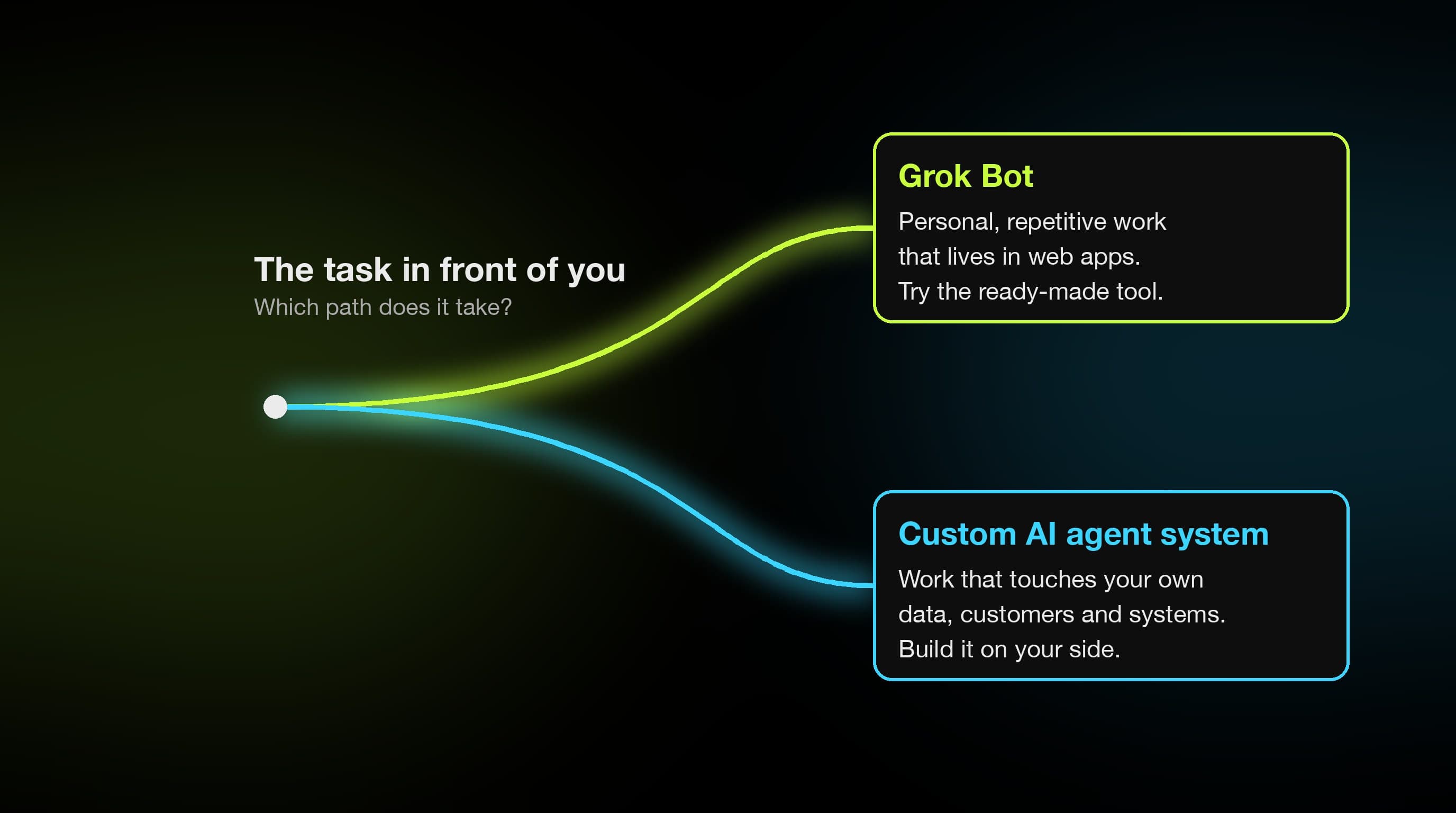 The rule in one picture: general work on the tool, your own work on your own system.
FAQ
What is Grok Bot, in plain words?
A service from xAI: named AI agents that work on their own computer in the cloud. You message one with a task. It does the work on that computer and comes back with a result. It isn't the Grok chat at grok.com, and the official material is in the Grok Bot documentation.
How much does Grok Bot cost?
It has no price of its own. It comes with every paid individual Cursor plan and with Cursor Teams. Cursor Pro is $20 a month. If you prefer, you can link a SuperGrok subscription, which is $30 a month. Prices are in US dollars. Each plan has weekly usage caps.
Does Grok Bot keep working when I close my laptop?
Yes. The bots run on a computer in the cloud, not on your device. You close the app or the laptop and the task carries on. The FAQ in the official docs confirms it.
Do I need to know how to code to use Grok Bot?
To give it instructions, no, you write in plain language. To get access, you need a Cursor account, which is a developer tool, or a linked SuperGrok subscription. So the road in runs through developer software, and the use itself is messaging.
Can Grok Bot connect to my ERP or booking engine?
It depends. If your system has an API or a connector, the bot can use it directly. If not, it will try through the browser with computer use, and it will call you for approval on every password, CAPTCHA or identity check. A program that only runs on the office PC, with no web access, is out of reach for a computer in the cloud.
What's the difference between Grok Bot and a custom AI agent?
Grok Bot is a general tool from xAI, and its computers run in Cursor's cloud. A custom agent system is built on your own data and systems, and tested on your own cases before it goes live. It runs where you decide. One you buy in minutes. The other you design with someone who knows what they're doing. The choice depends on whether the work is personal or operational.
Where to start
If you want to try Grok Bot, start from the product page and the docs. Skip the videos. Pick one task you do every week in web apps, with no payments and no customer personal data. Show it to the bot once. Count how many times it called you for approval and how much time it saved. Within a few days you'll know. If you run that test on a Greek back office, I'd like to hear what you saw. It's the one test I haven't done.
If the work you want to hand to an agent touches your booking engine, your accounting, your quotes or your customers, then "Grok Bot or not" is the wrong question. The right one is "which system fits my business", and my step-by-step guide to AI implementation shows how I answer it. For what that looks like in practice, here are AI automation examples from systems I've built. That's what I build, and if you want to talk it through on your own case, the contact form is the fastest route.